
The Short Answer
Plan on a month per brand: Amazon's own review step takes two to seven business days, and the rest of the month goes on the supplier, the invoice and the first decline. That month is our planning figure, not a date Amazon publishes.
Ungating means approval to list a brand or a category your account cannot list today. There is also a route with no application at all: an aged Amazon account whose record already shows that brand open. That route starts on our aged Amazon seller accounts page.
2 to 7
business days, Amazon's own review step
1 month
per brand, the figure we plan on
3
brand approvals named in every Deal Agreement we sign
Category Approval and Brand Approval Are Two Applications
Both get called ungating, which is why the timelines you read disagree. Category approval is permission to list in a whole department. Brand approval is permission to list one brand. Amazon runs both through the same apply-to-sell flow: its own example of selling Nike shoes needs Shoes category approval and Nike brand approval together, because "Some products require multiple approvals."
Amazon publishes its common restricted categories on its categories and products that require approval page: grocery and gourmet foods, luggage and travel accessories, medical devices and accessories, and shoes, handbags and sunglasses.
| Approval | What it covers | What you file | How long the review runs |
|---|---|---|---|
| Category approval | A whole department on Amazon's restricted list | Purchase invoices dated within 180 days, clear product photos, and for some categories safety certifications or commercial liability insurance | "Wait for review (2-7 business days)", on Amazon's own page |
| Brand approval | One brand, one application | The same file, plus brand authorization letters where they apply | The same review step, run once per brand. The calendar time goes on the rounds before it |
Brand approval is the one we mean by a month per brand.
If you are not sure which gate you are hitting on a given product, the test is in how to check if a brand is gated on your Amazon account.
Error 18077: Where the Clock Usually Starts
Error 18077 is the code Amazon returns when the brand on a listing needs approval your account does not have. Amazon's Error 18077 page gives the first reason this way:
"A seller attempts to list or sell products under a brand name that requires explicit authorization or approval from Amazon, and the seller's account does not have the necessary permissions or brand registry enrollment."
The same page names three more causes: the brand is enrolled in Brand Registry by another party who blocks new listings, your account lacks the brand relationship or authorization documents, or the brand is on Amazon's restricted brands list.
Amazon's fix: confirm a legitimate relationship with the brand owner, manufacturer or authorized distributor, with invoices, letters of authorization or distribution agreements to prove it. Then apply through the selling application process or Brand Registry, or ask the brand owner directly. Brand Registry is for the brand's owner: Amazon's Brand Registry page says "You must be the trademark owner. If you are an authorized agent, have the trademark owner enroll the brand, then add you as an additional Brand Registry account user."
The page gives no timeline for any of that. So read the error as day one of the month, not as a decline.
The Ungating Timeline: Where the Month Goes
An application looks like one form. The wait around it has five parts:
| Part of the wait | Whose clock | What sends you back to the start |
|---|---|---|
| Checking the brand can be applied for at all | Yours, before any money moves | A brand Amazon is not taking applications for; no open ASIN to apply against |
| Getting stock you can prove you bought | Yours, and your supplier's | No invoice that proves your right to sell the brand |
| Filing the application | Yours | Missing invoices, letters of authorization or distribution agreements |
| Waiting for the answer | Amazon's | Nothing to do here but wait |
| Fixing a decline and filing again | Yours, then Amazon's again | Whatever caused the decline, left unfixed |
An ASIN is the catalog number Amazon gives each product listing. Before you buy stock, check that Amazon is taking applications for that brand and that there is an open ASIN to apply against. Not every brand opens, and the stock is yours either way, so make the first buy the smallest real quantity that gets you a proper invoice.
When you are not the brand owner, the invoice question turns into an authorization question. A letter of authorization is the brand's own written permission for you to sell it. Amazon's letter of authorization page accepts it as a PDF or a scan of one, a screenshot of an email from the brand's own domain, or letterhead from the company that holds the brand rights.
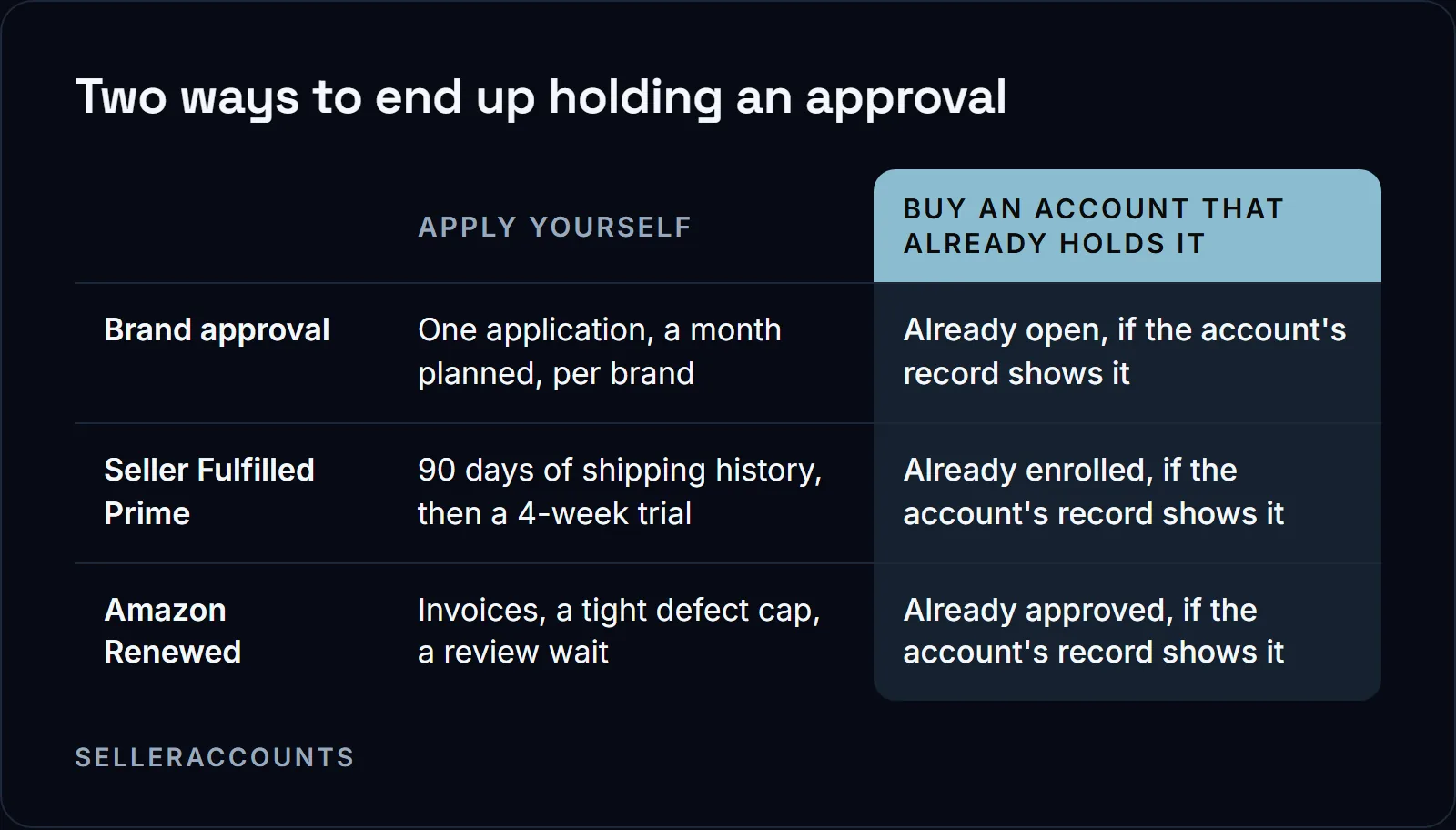
The review step is short. What stretches one brand to a month is how many times you go around it. Ten brands is ten applications, each with its own stock buy and its own invoice. By our planning, those months run side by side rather than one after another, as long as you can fund ten stock buys at once; if you cannot, they queue behind your cash.
What Actually Makes It Faster
- Fix your metrics before your paperwork. Some categories read the account before they read the file: Amazon's Jewelry page sets a "Cancellation Rate of 2.5% or less" and says "If your account does not meet the minimum criteria, your Fine Jewelry application will be rejected." A clean file does not rescue a failing account.
- Be on the selling plan the category needs. The same Jewelry page says "Sellers without a Professional selling plan must upgrade to a Professional selling plan once their application is approved, and must maintain this plan while offering jewelry products on Amazon."
- Read the decline before you file again. When Amazon's answer is that your account does not qualify, its page says "This decision cannot be appealed" and "Selling Partner Support cannot provide additional details". That is the answer to spend the next month on a different brand rather than on a second filing.
The Other Route: An Account That Already Holds the Approvals
Two different things sit under the word ungated. Already ungated means the account can list that brand today, with no application at all. Apply to sell means an application still has to go in first. Which brands an account holds outright, and which are apply to sell, is on that account's own record. Send us the brands or product codes you care about and we come back with the result for each one, before you sign.
| Filing it yourself | Buying an aged account | |
|---|---|---|
| A brand already open on the account | Not possible on a new account | Listed today, no application |
| A brand still on apply to sell | A month per brand, by our planning | Three applications we file, named in your Deal Agreement |
| Hazmat, Seller Fulfilled Prime, Renewed | Qualify from zero | Only where that account's record carries them |
| Time until you can sell | A month per brand, by our planning | 10 to 14 business days standard; about half of transfers run 30 to 60 days |
We have sold 1,700+ accounts since 2020. Amazon's own help page says that when the ownership of a business changes, the new owner must establish a new seller account. Read that before you buy: taking over an existing account goes against what Amazon's page says, and that is a decision to make with the rule in front of you. What we change by hand is the ownership data on the account, the INFORM Act verifications, the email, the 2FA and the phone. What stays is the account itself, its history and the approvals on its record. The steps are in how an Amazon account transfer works.
A deal with us is a mutual Deal Agreement signed before any money moves, then payment upfront, directly to us, to the company named in the agreement. Starting prices are on how much an aged Amazon account costs; the figure for a specific account comes with that account's details, on the call.
The Three Brand Applications We File for You
Three brand approvals come with every account we sell, apply to sell only, each named in your Deal Agreement before you pay. If a brand we promised is still gated at delivery, we keep working on it, and the 30 day clock runs from delivery: a replacement account, then a refund, if it is not open by day 30.
Past those three, brand ungating is a paid service of ours, on an account you buy from us or on one you already own. What has to be true first: standard brands only, Amazon has to be taking applications for that brand, we confirm an open ASIN, and the invoice has to be sourceable against the entity registered on the account. We do not open human digestibles, meaning supplements and anything else a person swallows. The expectation on a paid job is one month for one brand: a first decline is normal, we keep working the application inside that window, and it is often done sooner.
Approvals Past Brand Names
The approvals worth chasing past brand names are the ones that are hard to win from zero: Seller Fulfilled Prime, hazmat and Amazon Renewed. Amazon sets out what each one takes.
| Approval | What Amazon requires | The wait |
|---|---|---|
| Seller Fulfilled Prime | 90 days of your own shipping record: 100 seller-fulfilled packages, cancellation under 2.5%, valid tracking above 95%, late shipments under 4% | A four week trial you can still fail |
| Hazmat (dangerous goods) | Enrollment in the program, then a safety data sheet that matches your listing and carries all 16 standard sections | "The typical waiting time for program enrollment is five business days", and "At this time, there is no way to expedite enrollment into the program." |
| Amazon Renewed | Paid invoices that meet a minimum total purchase value over the past 90 days, set higher for Apple products, and an order defect rate of 0.8% or less in the trailing 60 days | "We aim to review all applications within 10 days of submission and respond accordingly." Processing times vary. |
None of the three is decided by age on paper. An aged account can already hold one, so there is nothing left to apply for; keeping it is still your job. The two starting points side by side are in aged Amazon account vs. new account, and the first month on a bought account is in how to protect your Amazon account after transfer.
If you want to sell an account rather than buy one, that is Cash For Stores (cashforstores.com): they buy accounts from their owners.
FAQ
How long does it take to get ungated on Amazon with a brand new account?
Amazon's own review step is two to seven business days. The month per brand is the expectation we set on our own paid ungating jobs: a first decline is normal, we keep working the application inside that window, and it is often done sooner. On a new account, the stock and the invoice come first, and that part runs on your clock, not Amazon's.
What invoices does Amazon accept for ungating?
Amazon's categories page asks for purchase invoices dated within 180 days, with clear product photos showing all sides. On a paid job with us, the supporting invoices come in the store's registered company name, and with no open ASIN the application cannot go in at all.
What should I do if my ungating application keeps getting declined?
Check the invoices or letters of authorization you filed, then the listing you applied against. Fix whichever one is wrong before you file again. After a month of real attempts on one brand, change the plan rather than the paperwork: a different supplier, a different brand, or an account that already holds it.
How much does Amazon ungating cost?
Filing it yourself costs a stock buy for every brand you apply for, plus a month per brand on the calendar. Brand ungating with us is a paid service, priced per brand on the call. How a deal is set up is in how buying works.
How long does the handover take when you buy an aged Amazon account?
One clock covers the whole account, whatever brands it holds, so there is no separate wait per brand. When Amazon asks for an extra verification, the transfer runs longer, which is the same transfer taking longer, not a sign of a problem with the account. How you can pay, the card fees and the support window are in how buying works.
Related pages
Ready to Grow Your Amazon Business?
Book a free demo call and we'll screen-share real accounts live to find the right match for your business. No screenshots, no guesswork.
Book Your Demo