
How Do You Protect Your Amazon Account After Transfer?
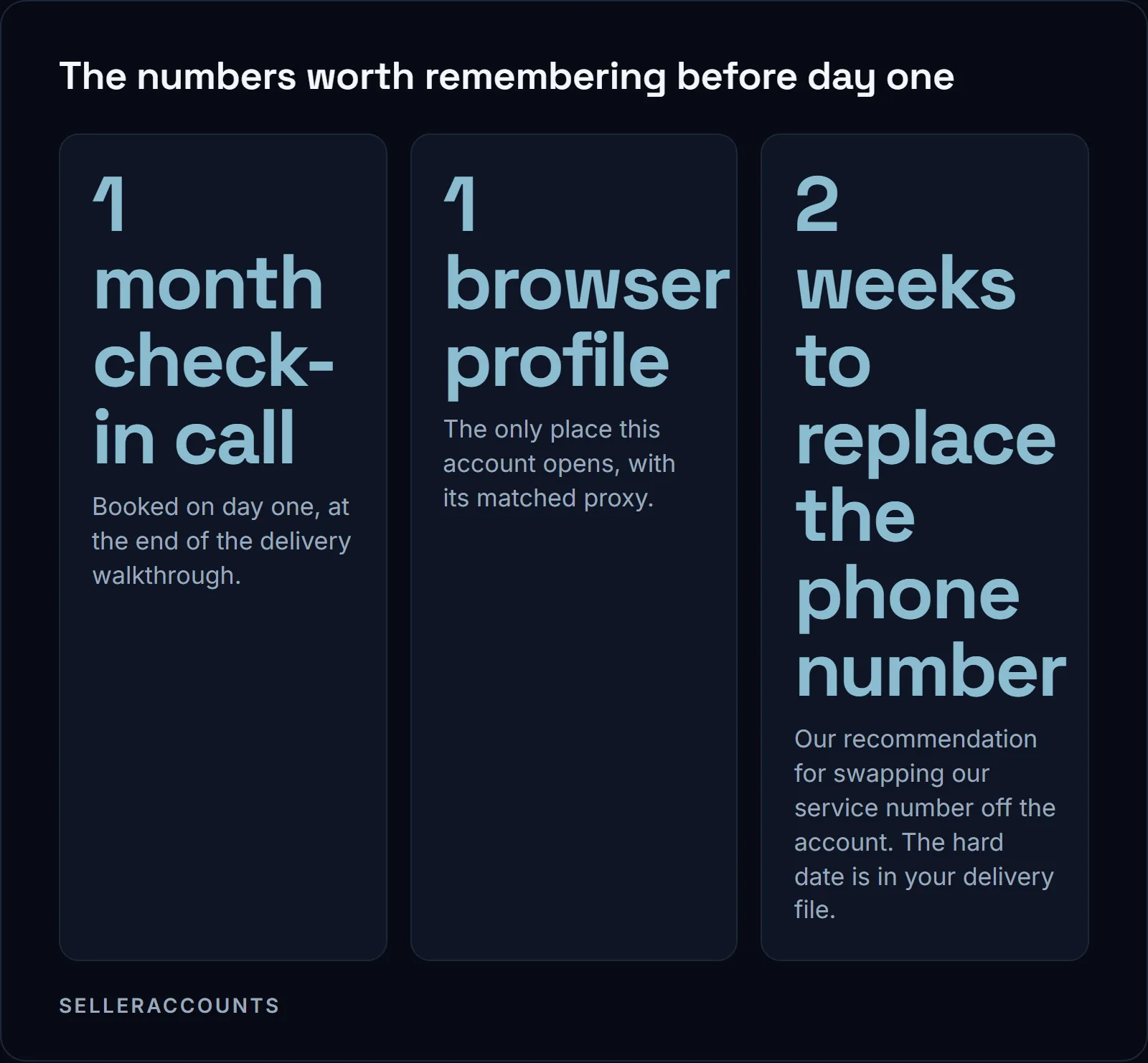
Open the account only in the anti-detect browser profile and matched proxy, load the delivered 2FA code into your app, change the password. Check, do not redo, what Amazon already re-verified. Replace the service phone number the account was delivered with, inside two weeks. Support runs 30 days from delivery or until your first sale, whichever comes first.
The anti-detect browser holds one profile per account, a separate device identity, so this account never shares a browser fingerprint with anything else on your computer. The proxy is one fixed IP address the account comes from. Both arrive with your credentials. Your first sale closes the support window early, so the setup work below belongs in front of it.
Day 1: Before You Touch Anything
Your account is delivered inside an anti-detect browser profile with a proxy matched to it, or into your own anti-linking setup if you chose that at onboarding. Open it there and nowhere else.
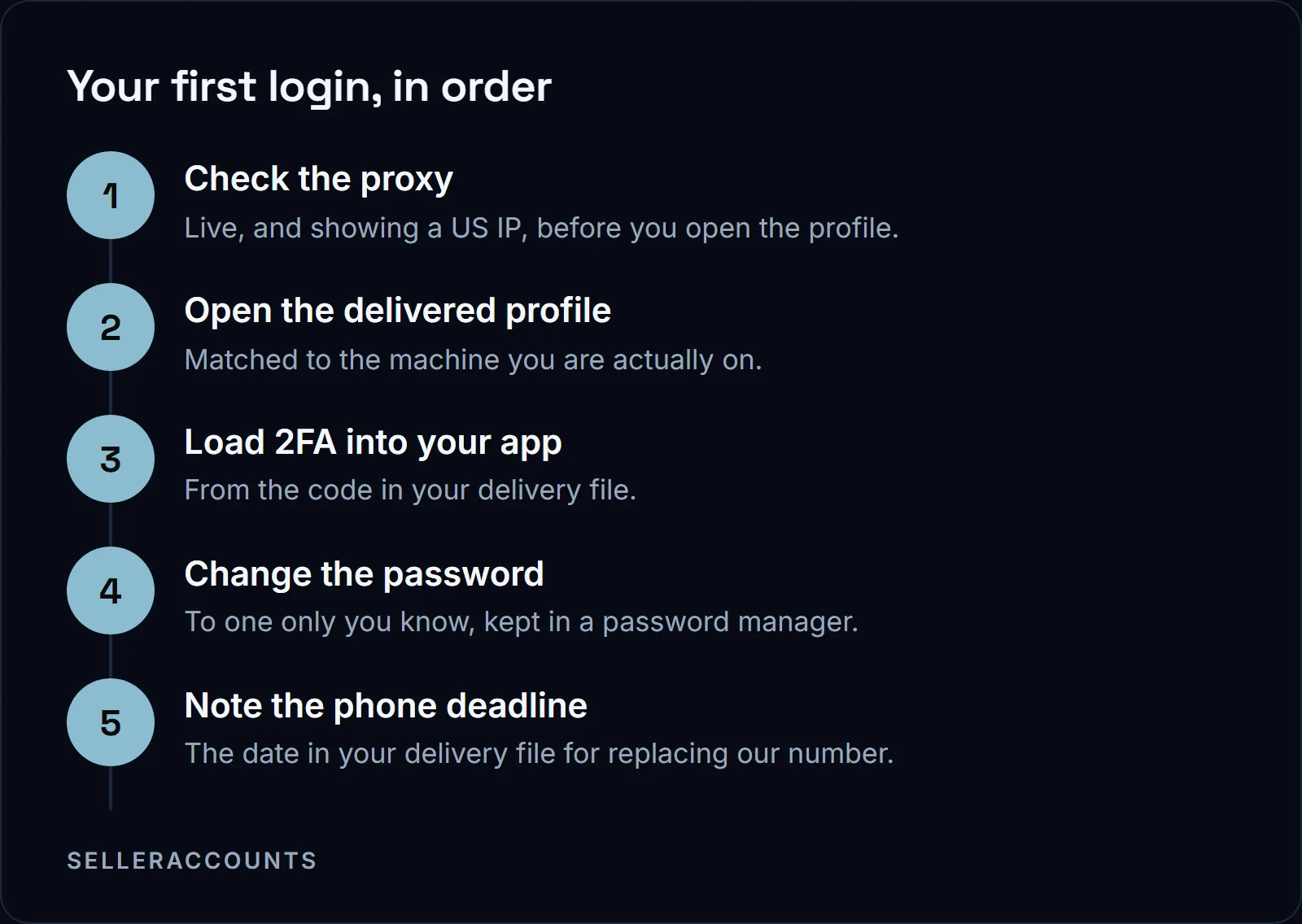
A plain Chrome or Firefox profile is not a substitute, even when it logs in fine. Match the profile to the machine you are on, Windows on Windows and Mac on Mac, because a mismatch is a red flag to Amazon. Keep the browser on its latest version and the services paid up front, because a lapse costs you secure access until it is renewed.
Our portal offers two apps for the codes, 2FAS and Google Authenticator, and we no longer recommend Twilio Authy. Whichever you pick, keep the 2FA code from your delivery file in your password manager and never leave a screenshot of it in your phone gallery. Two-step verification is already on when the account reaches you; the job is loading our code into your app. Lose the phone and the copy in your password manager is what puts the code on a new one.
Days 2 to 4: Check What We Already Changed
During the transfer we changed the ownership data and Amazon re-verified it: government ID, business address, bank, working email, tax ID and the designated point of contact. The previous owner's company, ID, card and bank details came off the record at the same time, along with old addresses, cards and subscriptions. Our transfer guide walks through that work step by step.
So this stretch is for checking, not re-entering. Log in and confirm the login and notification emails are yours. Amazon's own security page asks every seller to review their notification settings so they are told about important actions on the account.
Then go through every return and shipping setting and confirm the previous owner's address is gone from all of them, not just the first place you find it. If one is still sitting there, change it to yours or send it to us to change. Amazon has been seen to put a return address back on its own after a change, and until the old address is off every setting the returns keep arriving there, so if parcels start coming again the first change did not hold and needs doing twice.
Days 5 to 7: Keep This Account Unlinked from Any Other
Amazon looks at more than the login when it decides two accounts belong to the same person. Here is the list we build the setup against:
- IP addresses.
- Device and browser data: cookies, browser type, extensions, the fingerprint of the machine.
- Bank and payment information.
- Business and personal addresses.
- Seller Central login patterns.
- Phone numbers, login emails and the users on the account.
Any one of these shared between two accounts can tie them together. A link is not an instant suspension. It means that if one linked account is suspended, the others can follow. That is why the account comes with its own device identity, fixed IP, mailbox and number, on completely new company data.
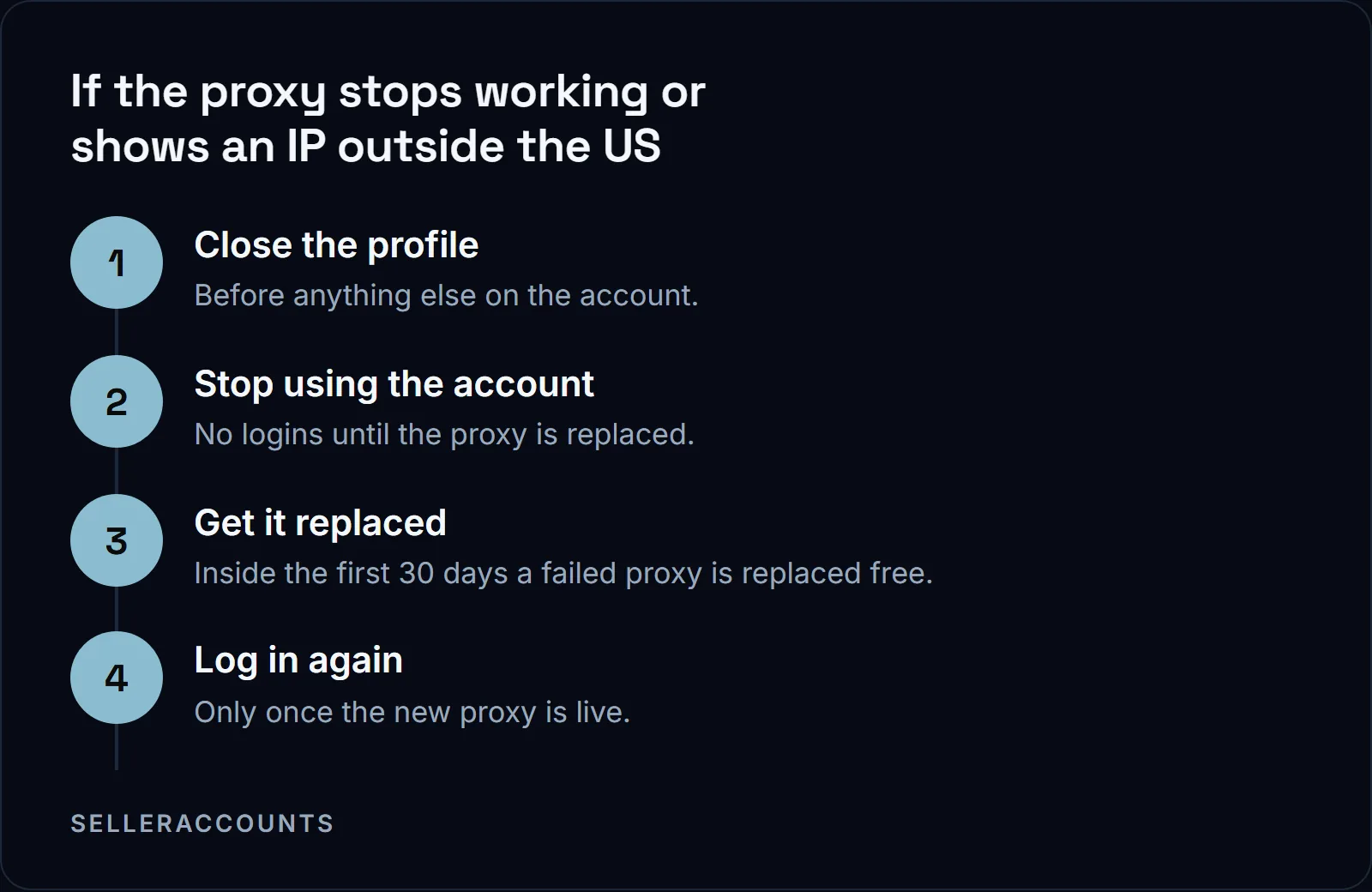
Use the proxy that came matched to your browser profile every session, whether or not you run another seller account. The profile and the proxy are the whole environment we hand you: we do not hand over a VPS. The proxy is a bridge for the first 30 days, and after that you move the account onto your own. If the profile or the proxy you are working in is not the one we delivered, stop and tell us before you log in again.
If you bring in a virtual assistant, never hand over your login. Give them their own Seller Central user login. Ongoing management and VA work are not part of what we sell.
Days 8 to 14: Replace the Phone Number on the Account
The number on the account at delivery is a service number of ours with an expiration date. It is there so the account works out of the box, and we do not hand it over. Swapping in your own is the first item on the post-delivery list in your portal.
The replacement has to be a number that has never been used on any Amazon account before, buyer or seller. A fresh personal mobile, a clean Google Voice number or a second carrier line all work. A number already sitting on another Amazon account is what gets this one flagged.
Two weeks after delivery is our recommendation, not an Amazon rule. The hard date is the one written into your delivery file, the one you noted on day one, so work to that. Leave it too long and our number expires, Amazon has no working way to reach you for verifications, and the account can lock.
Days 15 to 21: Start Listing Without Hurting Your Metrics
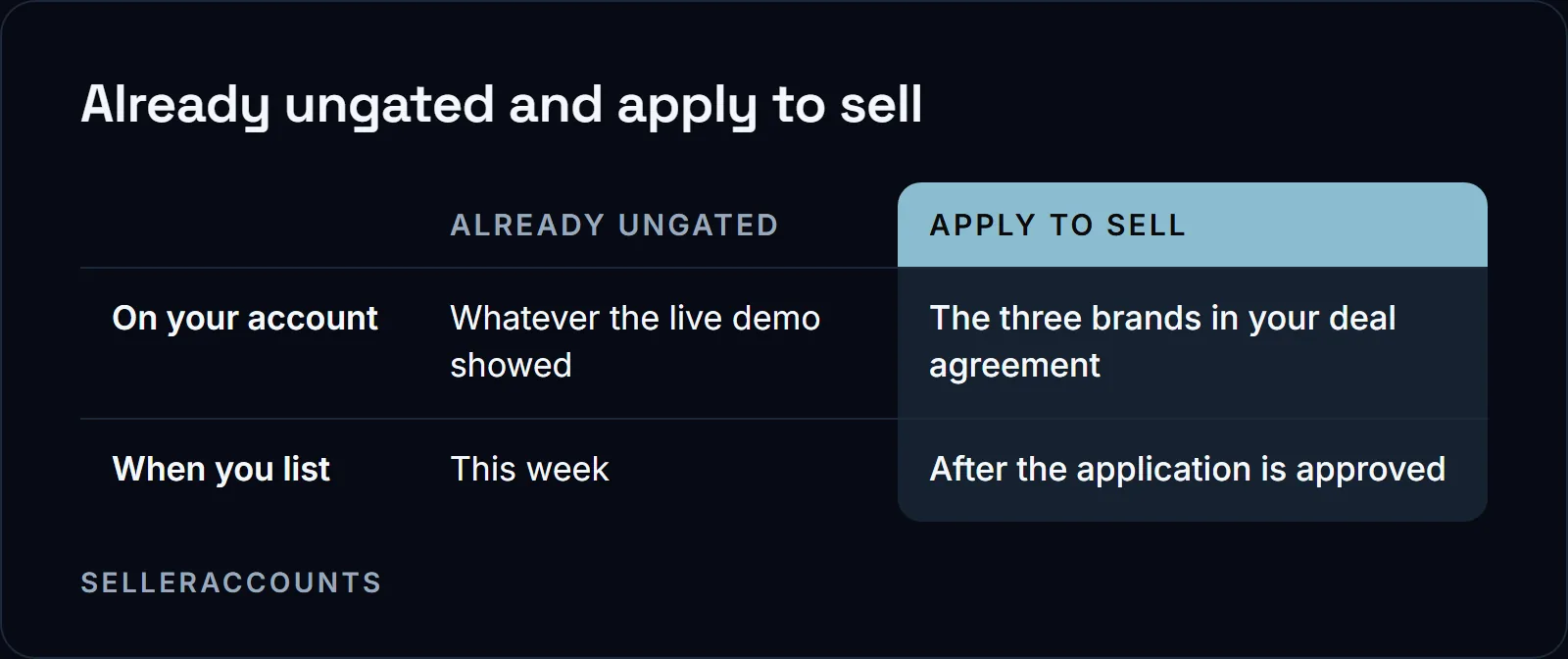
Start with the brands and categories that were already ungated on the account when you inspected it on the live demo, because those you can list in today. The three brand approvals written into your deal agreement are a different thing. They are apply to sell, which means invoices go in first and approval comes after, and that is work we do with you. Plan them as your second wave.
List a handful of products before you list hundreds, so shipping, customer service and your metrics settle before you scale. Your first sale through the account is also what closes the support window, so finish the security and environment work above before you switch the listings on. Message the customer the day an order goes wrong, rather than reading about it later in your feedback.
Order Defect Rate, Late Shipment Rate and Valid Tracking Rate are the three you watch daily. Which of Amazon's published program numbers apply to you depends on whether you are applying from zero or already hold the approval.
| Seller Fulfilled Prime | To pre-qualify, over the past 90 days | To keep it, once approved |
|---|---|---|
| Packages | At least 100 seller-fulfilled shipped | At least 100 Prime packages a month |
| Cancellation rate | Less than 2.5% | 0.5% or less |
| Valid tracking rate | Greater than 95% | At least 99% |
| Speed | Late shipment rate less than 4% | On-time delivery at least 93.5% |
Amazon Renewed asks an existing seller for an order defect rate of 0.8% or less over the trailing 60 days. Those are the bars Amazon publishes. Your own dashboard is what you act on daily.
Days 22 to 30: Keep Suppliers and Invoices in the Account's Name
Distributor trust is what account history unlocks, and the sales history, feedback and approvals on this account are a record a seller starting from zero cannot show for a year or two.
What you actually send is paperwork in one name. Amazon's own list for a restricted brand or category is purchase invoices dated within 180 days, clear product photos, brand authorization letters, and safety certifications or commercial liability insurance for certain categories. Those invoices have to be sourceable against the entity registered on the account, so open the supplier accounts in that company's name and no other.
For any brand past the three in your deal agreement, plan on about a month. Those extra brands are a paid add-on we file for you, and what one costs is not published, so that number comes from us and how buying works covers how the buying runs. A declined application is normal rather than a sign of a problem, and our ungating timeline guide covers where the month goes.
The one month check-in call you booked on day one lands in this stretch. Bring whatever is still open to it, the phone number included if ours is still on the account.
When Do You Contact Us Instead of Amazon Seller Support?
Verification re-submissions tied to the transfer, transfer-related suspensions and login problems come to us while your support window is open. Anything your own selling causes is yours: listings, pricing, shipments, feedback and the metrics they move. Send us the transfer-related ones the day they land rather than opening a case first.
| Situation | Your side | Ours, inside the support window |
|---|---|---|
| Identity or business verification | Attend the video call if you are the named point of contact | The re-submission tied to the transfer |
| A suspension that traces back to the transfer | Tell us the day it lands | Covered work while your window is open, and we handle the Amazon correspondence with you |
| Locked out, or a login that will not go through | Send us the screen you are stuck on | Login help is inside the window |
| Listings, pricing, shipments, feedback | Yours to run, day to day | Nothing to send us |
What Does Amazon's Own Security Page Say to Do?
Two things, and they apply to every seller, not just a new owner. Never hand over account details in reply to an email, however official it looks, because that is not how Amazon collects them. If the account looks compromised, change your Seller Central login password and contact Selling Partner Support. Nothing on that page turns on the account's age.
Amazon's account security page puts the phishing warning this way:
"Amazon never asks you to verify sensitive information via email. Submit such information only when completing an order on our website, registering to sell on Amazon, or updating account information in Seller Central."
The First 30 Days at a Glance
| Days | What to do |
|---|---|
| Day 1 | Proxy, delivered profile, 2FA into your app, new password, the phone deadline, book the check-in call |
| Days 2 to 4 | Check what we already changed, notification settings, the old return address |
| Days 5 to 7 | The matched proxy every session, one profile only, no shared login with a VA |
| Days 8 to 14 | Replace the phone number that came on the account |
| Days 15 to 21 | List what is already ungated, watch your metrics, message customers early |
| Days 22 to 30 | Supplier accounts in the right company name, new brands, the check-in call |
If You Are Still Choosing an Account
What comes with an account and how the handover runs is on our aged Amazon seller accounts page. We have sold 1,700+ accounts since 2020, and every buyer gets a delivery walkthrough for the first login, a post-delivery action list and a one month check-in call. We do not publish prices: the numbers on a specific account come from us, and what that page and how buying works explain is how the buying runs.
If you are on the other side of this, holding an account you want to leave rather than one you just bought, that is our sister brand: Cash For Stores (cashforstores.com) buys accounts from owners exiting the marketplace.
FAQ
Will Amazon suspend the account after an ownership change?
Amazon's own transfer help page does not answer that. It says seller accounts generally are not transferable and that a new owner must establish a new seller account, and it names no consequence for an account that changes hands. What we do is handle every verification Amazon asks for before your credentials reach you, and a suspension that traces back to the transfer is covered work while your support window is open.
Can I give a virtual assistant access to my Amazon seller account?
Not through your own login. Amazon's own page on transferring a seller account says that where the ownership of a business has not changed but the individuals responsible for managing the account have, you can add users to the account. Set the assistant up that way.
Why did Amazon re-verify everything during the transfer?
Because the INFORM Consumers Act requires a marketplace to collect and verify a high-volume seller's bank details, contact information, tax identification number and a current working email address and phone number. A seller is high-volume at 200 or more discrete sales of new or unused consumer products and $5,000 or more in gross revenues, in any continuous 12-month period during the previous 24 months. When ownership changes, the ID, business address, bank, email, phone, tax ID and point of contact all go through that check again.
What if a brand is still gated when the account is delivered?
We keep working on it, and the 30 day clock runs from delivery: a replacement account, then a refund, if it is not open by day 30. That ladder and every brand we promised are written into the deal agreement before you pay.
Related pages
Ready to Scale Your Amazon Business?
Book a free demo call and we'll screen-share real accounts live to find the right match for your business. No screenshots, no guesswork.
Book Your Demo