
How to Check If a Brand Is Gated on Your Amazon Account
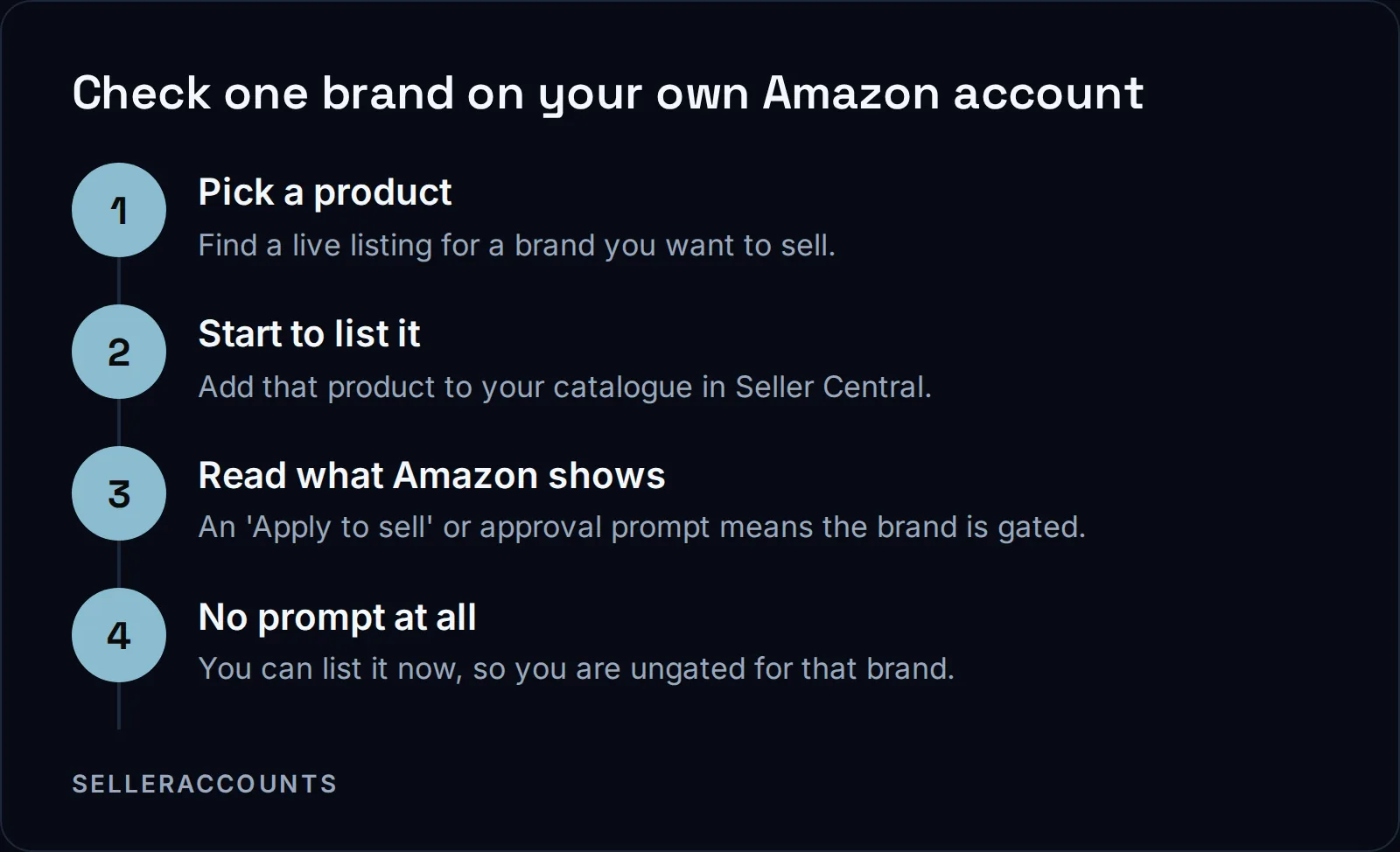
To check if a brand is gated on Amazon, go to Seller Central and start to list one of that brand's products. If Amazon shows an 'Apply to sell' prompt, or tells you approval is required, that brand is gated for your account. If you can list it straight away, you are ungated for it.
Gated means Amazon will not let you list a brand or category until you are approved for it. Ungated means you can list now. There is no single screen that shows every brand at once, so the check is done one brand at a time, on the account you are actually selling on.
This is why the answer to 'check if I am ungated for a brand' is always tied to one account. Gating is a property of your Seller Central account, not of the brand in the abstract. The same brand can be open on one account and closed on another.
What 'Gated' and 'Ungated' Actually Mean
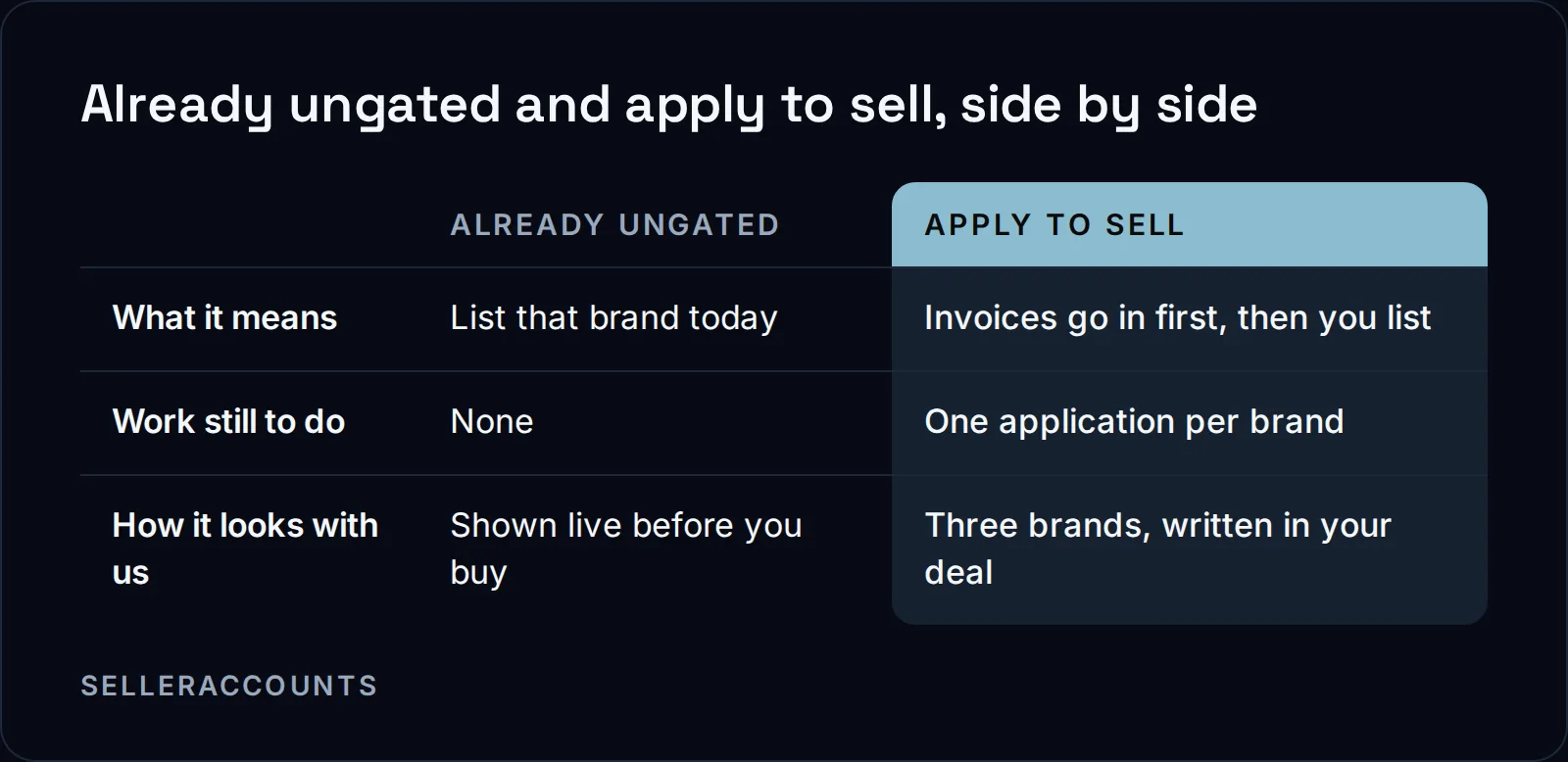
Two states matter when you run the check, and they are not the same. Already ungated means the account can list that brand today, with no application at all. Apply to sell is the gated case: an application, usually with invoices, has to go in and be approved before the first listing. Both show up in Seller Central, and knowing which one you are looking at saves a lot of guessing.
When you run the check, read the prompt closely. 'Apply to sell' is Amazon's own cue that approval is required first. If nothing blocks you, the brand is already open.
Brand Gate, Category Gate, or ASIN: Which One Are You Hitting?
A block you hit can be a brand gate, a category gate, or a single product restriction, and they stack. Amazon says plainly that 'Some products require multiple approvals'. Its own example is that selling Nike shoes requires both Shoes category approval and Nike brand approval. So one 'Apply to sell' prompt can hide two separate approvals.
If you check one product and get blocked, work out whether the block is the brand, the whole category, or that exact listing. Amazon's page on categories and products that require approval lists common gated categories, from grocery and gourmet foods to shoes, handbags and sunglasses, and it tells you what to prepare before you apply:
'Purchase invoices (dated within 180 days)'
Alongside the invoices, Amazon asks for clear product photos, brand authorization letters where they apply, and safety certifications or commercial liability insurance for some categories. It then lists a review of 2 to 7 business days. If you want to read the requirements first hand, they are on Amazon's categories and products that require approval page.
Why a Brand Can Be Gated for You but Not for Someone Else
Gating tracks your account, so two sellers looking at the same brand can see different answers. Amazon ties approval to what your account can show: invoices, documents, and in some categories your performance metrics. It also warns that a brand you sold before can close again. In Amazon's own words:
"Even if you were selling your product before, you may be subject to new restrictions for the following reasons:"
Why gate a brand at all? To protect it. Brand owners enroll in Amazon Brand Registry, which Amazon describes as a way of "unlocking a suite of brand-building tools and protection benefits". Gating is part of that protection. Amazon does not publish the full list of what triggers a gate on a given brand, so neither do we.
Account age is not on Amazon's list of criteria for opening a brand. What an older account can have is approvals it already earned, sitting on its record. That is a real edge, but only where the record carries it, never as a blanket rule. So the real question of which brands you can sell comes back to reading the account, not trusting its age.
If Amazon returns 'Your account does not qualify', its page says 'This decision cannot be appealed', and Selling Partner Support cannot provide additional details. The full timeline for the brands that can open is in how long Amazon ungating takes.
Tools and the Restricted Brand Checker Question
People search for an 'Amazon restricted brand checker' hoping for one button that lists everything. The pages we work from describe checking one product or brand at a time, not a single account-wide report, so we do not claim one exists. Amazon does list eligibility tools in its Selling Partner Appstore, including a browser extension it describes as doing "Real time eligibility or ungating checks for the seller account."
Those tools speed up the per-product check while you source. Before you own an account, there is no account for a checker to read.
The Faster Check: Have Us Run It Before You Buy
We run this check for a living. Before any demo, we take the brands or product codes a buyer cares about and test them against a real account, then come back with a result for each one. Send the list as a spreadsheet or plain text; we have taken lists of several thousand product codes and matched them. That way you know what is already ungated versus apply to sell before you sign, not after.
Every account we sell comes with three brand approvals, apply to sell only, each named in your Deal Agreement so there is no argument later about what was promised. Whatever else the account already holds is shown live on the demo, on that account's own record, never as a number we promise in the abstract. The brands you see on a listing come from a pool of eighty to one hundred we check, so two brands on a listing does not mean the account is capped at two.
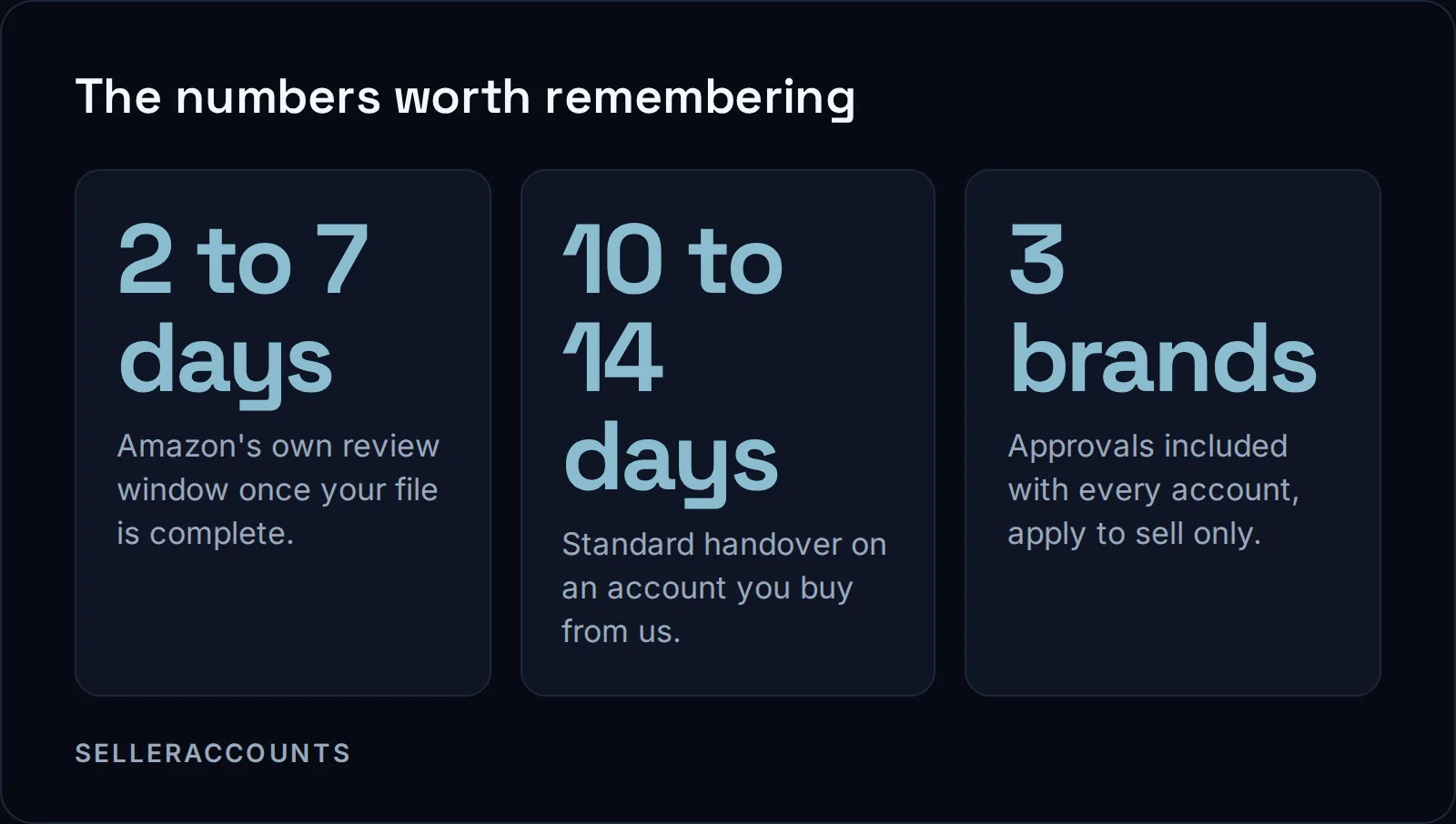
How the deal runs: you sign a mutual Deal Agreement first, before any money moves, then pay upfront to a named company by wire, ACH, Zelle, card, or crypto, with a card fee of 3 percent on US cards and 4.5 percent on non-US cards. Standard Amazon handover is 10 to 14 business days, and about half of transfers draw an extra verification request and run 30 to 60 days. Support runs 30 days from delivery or until your first sale, whichever comes first. Starting prices are on how much an aged Amazon account costs; for a specific account start at the aged Amazon seller accounts page or read how buying works.
If you are weighing this against building from zero, the trade-offs are laid out in aged Amazon account vs. new account and how much an aged Amazon account costs. And if you are on the other side, holding an account you want to sell, that is our sister brand's lane: Cash For Stores (cashforstores.com) buys accounts from their owners.
FAQ
How do I check if a brand is gated before I even have an account?
You cannot get a real answer without a logged-in account. Amazon lists eligibility tools that check a live account, but they need an account to read. Before you buy, the reliable move is to have the account holder run the check, which is what we do on every account before a demo.
Does an aged account skip gating automatically?
No. An aged account can already hold approvals a new account has to earn, but which brands it holds is on that account's own record, named only where it is true. Amazon does not treat age itself as a reason to open a brand. Bring your brand list and we check it against the actual account.
What does 'Apply to sell' mean when I try to list a product?
It is Amazon's cue that approval is required before you can list that brand or product. Prepare purchase invoices dated within 180 days and clear product photos, plus a brand authorization letter if you are not the brand owner. Amazon then lists a review of 2 to 7 business days. Some products need more than one approval at once.
Can a gated brand open without an application at all?
Yes, in one case: taking over an account that already holds the approval, so there is nothing left to apply for on that brand. Otherwise you file the application and wait. We open apply-to-sell brands as a paid service, and three come with every account we sell, each written into the Deal Agreement.
Related pages
Ready to Grow Your Amazon Business?
Book a free demo call and we'll screen-share real accounts live to find the right match for your business. No screenshots, no guesswork.
Book Your Demo