
The Short Answer
Our aged Amazon accounts for sale are US Seller Central accounts opened years ago, each with its own sales history, feedback and account health, and often already ungated for dozens of brands, shown live before you buy. You inspect the real account on a call, sign a Deal Agreement, pay upfront, and we move it into your company.
An aged account is a seller account that has been open and selling for years, so it carries a record a new registration does not have. Ungated means the account can already list a brand or category that Amazon restricts.
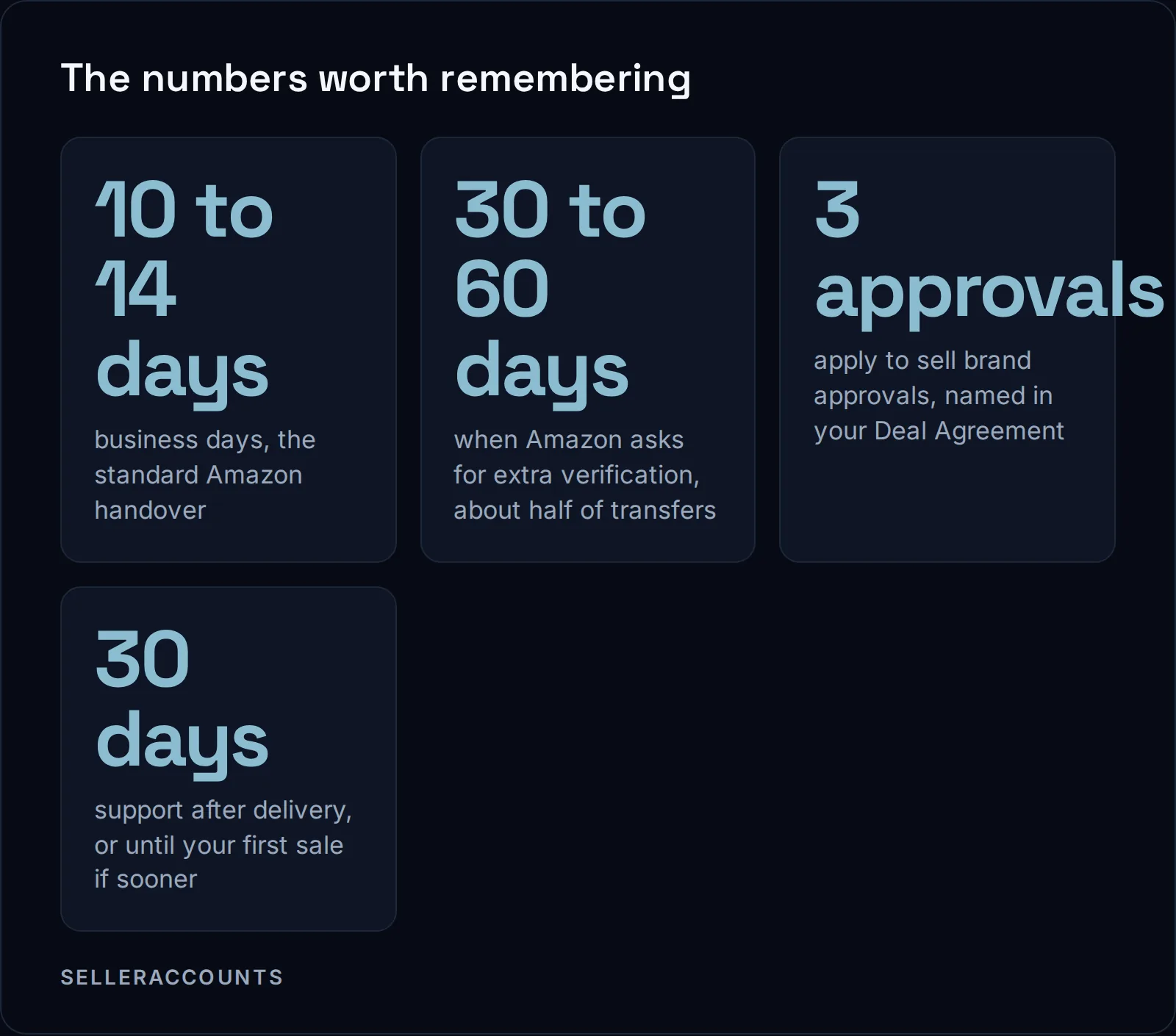
We have sold 1,700+ aged Amazon, Walmart and eBay seller accounts since 2020. Amazon is the core of what we do. The standard handover is 10 to 14 business days. About half of Amazon transfers get an extra verification request, and those run 30 to 60 days. We tell you both numbers before you sign.
This page is for sellers who want to buy an Amazon seller account and start on a store Amazon already knows. If you want to sell an account instead, Cash For Stores buys them at cashforstores.com.
What Comes With an Aged Amazon Account?
You get the account itself, everything already ungated on it at inspection, its sales history, seller feedback, account health, restock limits and storage allowance, and Brand Registry where the account holds it. On top of that, three brand approvals come with every account we sell, each named in the Deal Agreement.
Those three are apply to sell approvals. Apply to sell is Amazon's status for a product that needs approval before you can list it: invoices go in, Amazon reviews, and only then can the account list. We do that work for you.
Age, feedback score and lifetime sales differ from store to store. So we never quote a general number. We quote the figures for the specific account you are looking at.
What is not included:
- Inventory or active listings, unless the agreement says so.
- Ongoing management or VA work.
- Approvals beyond the three included, unless you add them.
- EU or UK marketplaces. We close them on the accounts we sell, because they are too complicated to transfer. You get the US marketplace, and Canada where the account already has it open.
Why Buy an Aged Account Instead of Opening a New One?
A new account starts with no sales history, no feedback and no approvals, and wins brand access one brand at a time. An aged account can already hold approvals a new one waits months or years of selling history to qualify for. You skip that wait. You do not skip Amazon's rules.
Amazon's page on categories and products that require approval lists what a brand or category application asks for: purchase invoices dated within 180 days, clear product photos, brand authorization letters where they apply, safety certifications when required. Then you wait for review, 2 to 7 business days per Amazon. If the answer is "Your account does not qualify", Amazon states that the decision cannot be appealed.
Some programs are harder still. Seller Fulfilled Prime, for example, asks a seller to pre-qualify on its last 90 days of seller-fulfilled shipping, then pass a trial. In Amazon's words: "Second, you must pass the trial by participating for 4 weeks while meeting all of the trial requirements." Hazmat, Amazon Renewed and gated brands each have their own bar.
An aged account may already have some of these. We name an approval only where that account's record carries it. No page of ours promises them on every account.
| Opening a new Amazon account | Buying an aged Amazon account | |
|---|---|---|
| Sales history and feedback | None | The account's own, in the state you inspect |
| Brand approvals | Applied for one at a time, each reviewed | Often dozens already, plus three apply to sell approvals in your agreement |
| Hazmat, Seller Fulfilled Prime, Renewed | Qualify for each from zero | Held only where the account's record shows it |
| Who deals with Amazon | You | We handle every Amazon interaction during the transfer |
| Time until you can sell | As long as building takes | 10 to 14 business days, or 30 to 60 with extra verification |
The full side by side is in aged versus new Amazon accounts.
How Can You Check an Account Is Real Before You Pay?
You check it on the live account, not on a description of it. On the demo we screen share the real Seller Central dashboard: brand approvals, FBA capacity, sales history and account health. The account as inspected on that call is what we commit to deliver, and the Deal Agreement writes it down.
A screenshot can be edited. A spec sheet can be selective. A live dashboard you watch being clicked through is much harder to fake.
Before the call, send us the brands or product codes you care about, as a spreadsheet or plain text. We check each one against the account and come back with a result per brand. We have taken lists of several thousand product codes. If the list is long, tell us which brands must already be open, so we can separate them from the ones that would need apply to sell.
What to look at on the demo:
- Brand and category access. Search the brands you plan to sell and see the status yourself.
- Account health. The rating and any open notifications.
- Sales history. Recent orders, not only lifetime totals. The account worth buying is one selling now and cleanly.
- Feedback. The score and how recent it is.
- Brand Registry, if the listing says the account holds it.
Is Buying an Aged Amazon Account Allowed?
Amazon's own help pages say a seller account cannot be transferred, and that a new owner of a business must establish a new seller account. The change of owner is not hidden: Amazon verifies the new owner's details during the transfer, and passing those checks is the transfer.
Here is Amazon's line, from Can I transfer my seller account?:
"If the ownership of a business changes for any reason, the new owner must establish a new seller account."
That page does not describe a procedure for moving an existing account to a new owner. So we will not describe one in Amazon's name. What we can tell you is how our transfer runs: the previous owner's company, ID, card and bank details come off the record, and yours go on. Amazon then checks the new details: government ID, business address, bank, working email, phone, tax ID and the point of contact. Passing those checks is the transfer.
For a legal view on your own situation, ask your own lawyer. We can tell you how the handover works, not what the law means for you.
What Are the Real Risks?
The main risks are that Amazon asks for extra verification and the transfer runs 30 to 60 days, and that the account later gets linked to another account you run. Amazon decides enforcement, not us. If we cannot deliver what we promised, the Deal Agreement gives you a replacement account first, then a refund.
Verification delays. About half of transfers get an extra verification request. Each redone check adds anywhere from 3 days to 4 weeks. One delay you control: if your company's EIN is not in Amazon's system yet, that alone adds 3 weeks to a month.
Running more than one account. Amazon's seller code of conduct asks every seller to "Not operate more than one selling account on Amazon without a legitimate business need". If you already sell on Amazon, mixing a device, IP, browser profile, payment details or address can link the accounts. We walk through the separation with you before closing.
Payouts. An aged account does not get paid faster. In general, Amazon settles every two weeks, and since March 2026 it holds each order until seven days after delivery, called DD+7, as its standard reserve. Amazon can extend that on risk. It never shortens it because an account is old.
A brand still gated at delivery. We keep working on it. These terms run 30 days from delivery, whatever happens with support: if the brand is not open by day 30, you get a replacement account first, then a refund.
How Does Buying an Account Work, Step by Step?
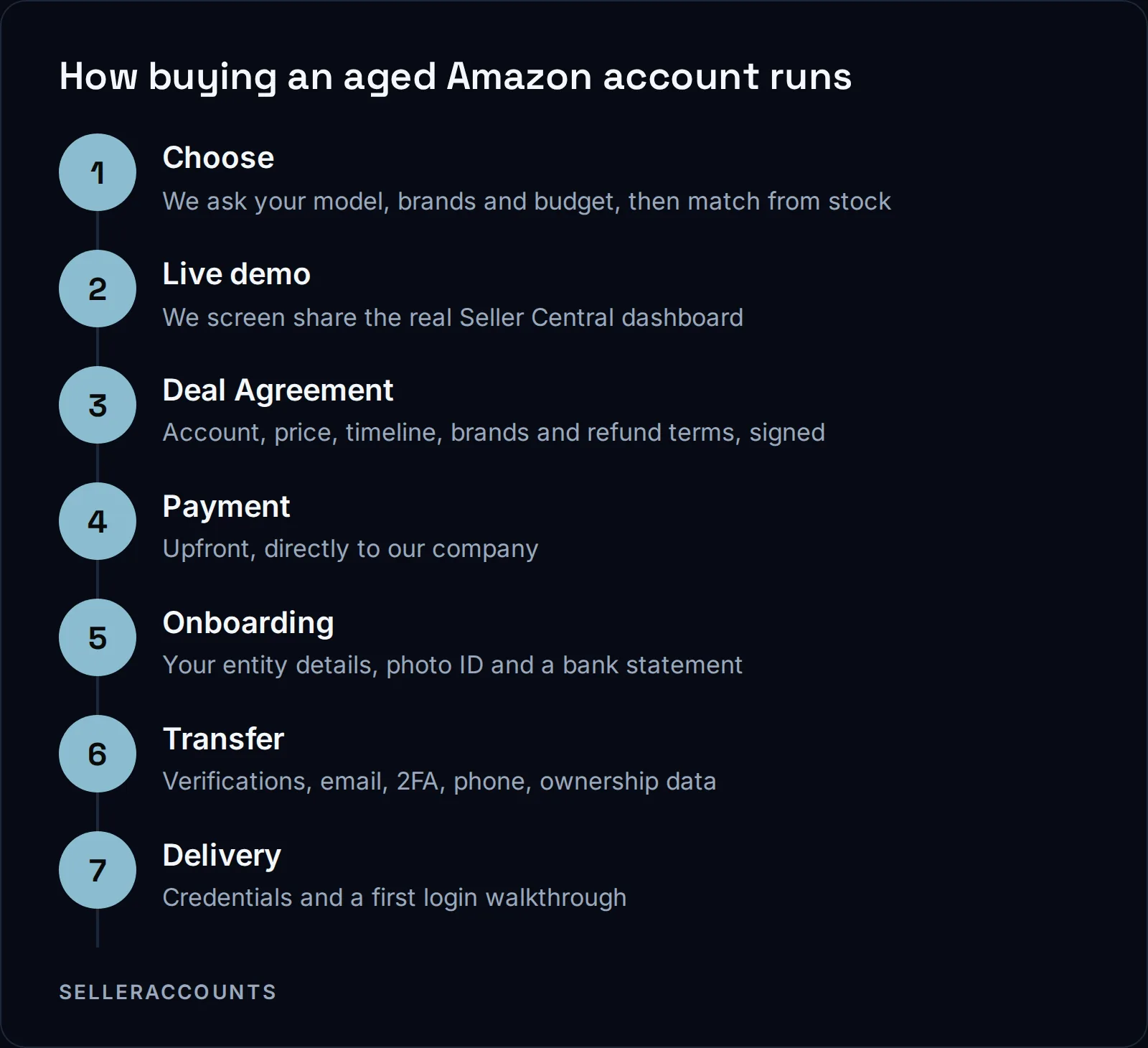
You tell us what you sell, we match accounts from stock, and you inspect one live. Then you sign the Deal Agreement, pay upfront, fill in two onboarding forms, and we run the handover by hand while you get a status update every business day. Credentials arrive at delivery with a walkthrough for your first login.
One step comes before all of these: form your company at least 30 days before you buy, or the EIN check alone can add 3 weeks to a month.
The Deal Agreement is the contract you sign before any money moves. It locks the account, the price, the payment terms, the timeline, every brand we promised, the support window and the replacement and refund terms. An Asset Purchase Agreement goes out too, but only when a buyer asks for it.
Payment goes upfront to our company, Seller Solutions Global LLC, by wire, ACH, Zelle, card via Stripe, or crypto in USDT or USDC only. Card carries 3 percent on US-issued cards and 4.5 percent on non-US cards. The rest carry no fee.
Support ends 30 days after delivery or at your first sale, whichever comes first. It covers verification re-submissions, transfer-related suspensions and login help. It does not cover anything your own selling triggers.
The full process, for every marketplace, is on how buying works. The handover itself, step by step, is in how an Amazon account transfer works.
What Does an Aged Amazon Account Cost?
The price depends on the account: its age, its sales history, its feedback and what it is already approved to sell. Starting prices are on our price page. The exact figure for a specific account comes with that account's details, on the call, next to its brand results.
When we quote an account, we normally give the marketplace, the age, sales, feedback and price together. So you compare like with like.
FAQ
Can I buy more than one aged Amazon account?
Yes, and buyers often do. Each account runs on its own transfer timeline, and one update covers all of them. Keep each one separate in device, browser profile, payment details and address.
Do I need my own company?
The account moves into your operating company. If you do not have one, we can open it for you through the portal.
Will an aged account get paid faster than a new one?
No. Account age does not shorten Amazon's reserve or its settlement cycle.
Do you sell UK or EU Amazon accounts?
No. We sell the US marketplace, and Canada where the account already has it open.
Do you sell Walmart and eBay accounts too?
Yes. See our Walmart seller accounts and eBay seller accounts.
Related pages
Ready to Grow Your Amazon Business?
Book a free demo call and we'll screen-share real accounts live to find the right match for your business. No screenshots, no guesswork.
Book Your Demo