
The Short Answer
Apply to sell on an Amazon listing means your seller account needs Amazon's approval before it can list that product. Until you apply and Amazon approves the request, the button stays where "Sell this product" would be, and you cannot add an offer.
- Gated means Amazon requires approval before an account can list a brand, a category or a product.
- Ungated means the account already holds that approval and can list today.
- Seller Central is the dashboard every Amazon seller works in; it is where the button, the application and its status live.
We sell aged Amazon seller accounts, 1,700+ since 2020, and brand approvals are the question most buyers bring to a call. Everything about Amazon's process here comes from Amazon's own pages, linked where we use them.
The Three Labels You Will See on a Listing
Amazon's page Categories and products that require approval names three status indicators. Each one tells you something different about your account and that product.
| What the listing shows | What Amazon says it means | What you do next |
|---|---|---|
| Sell this product | No approval needed | List it |
| Apply to sell | Approval required | Apply, with documents |
| Not Available | Product can't be listed | Nothing; your account cannot list it |
Amazon gives its reason in one line: "You need approval to ensure products sold in our store are safe, authentic, and meet regulations."
So apply to sell can be worked through, and Not Available cannot.
How Do You See Why a Product Says Apply to Sell?
Search for the product in Add a Product in Seller Central and click Show limitations. That view lists which approvals the product needs. If you tried to upload by feed and got a listing error, Amazon's FAQ says to use Add a Product on that ASIN to see the approval requirements behind it.
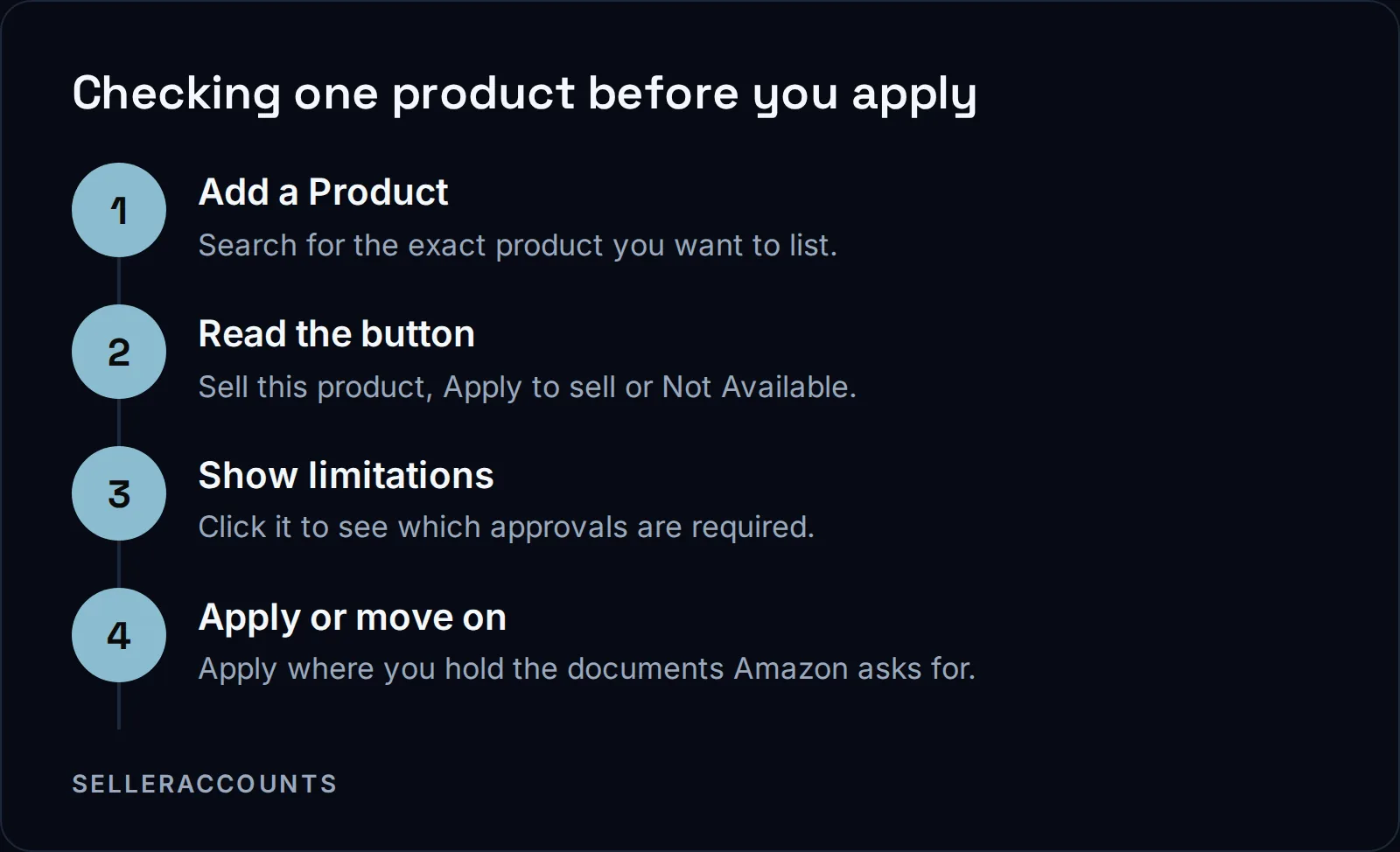
An ASIN is the product code Amazon gives each listing. You check gating per ASIN, because two products from the same brand can carry different restrictions.
Amazon's Selling Applications FAQ also points you to the approval page itself, to see whether the product type or category you plan to list in has selling restrictions. For a longer walk through brand checks, read our guide on how to check if a brand is gated.
Are You Applying for the Product, the Brand or the Category?
An apply to sell request can be for a single product, a whole brand or a category, and one listing can need more than one of them at once. Amazon places restrictions on single products or on groups of similar products, such as everything from one brand.
Amazon's FAQ puts it this way:
"Some products may have overlapping selling restrictions that will require you to submit separate applications to become approved to sell a single product. For example, you might need to submit an application for the brand in addition to the subcategory the brand is listed in."
Amazon's own example is Nike shoes, which need Shoes category approval and Nike brand approval. Two approvals, one pair of shoes.
Some categories need approval before you can list new products at all. The common restricted categories Amazon names include grocery and gourmet foods, luggage and travel accessories, medical devices and accessories, and shoes, handbags and sunglasses.
This is where sellers get caught: one approval may not be enough to list the product.
What Does Amazon Ask for When You Apply?
Amazon's approval page lists the documents to prepare: purchase invoices dated within 180 days, clear product photos showing all sides, brand authorization letters if applicable, and safety certifications when required. Some product categories also need commercial liability insurance documentation. Then Amazon's review takes 2 to 7 business days.
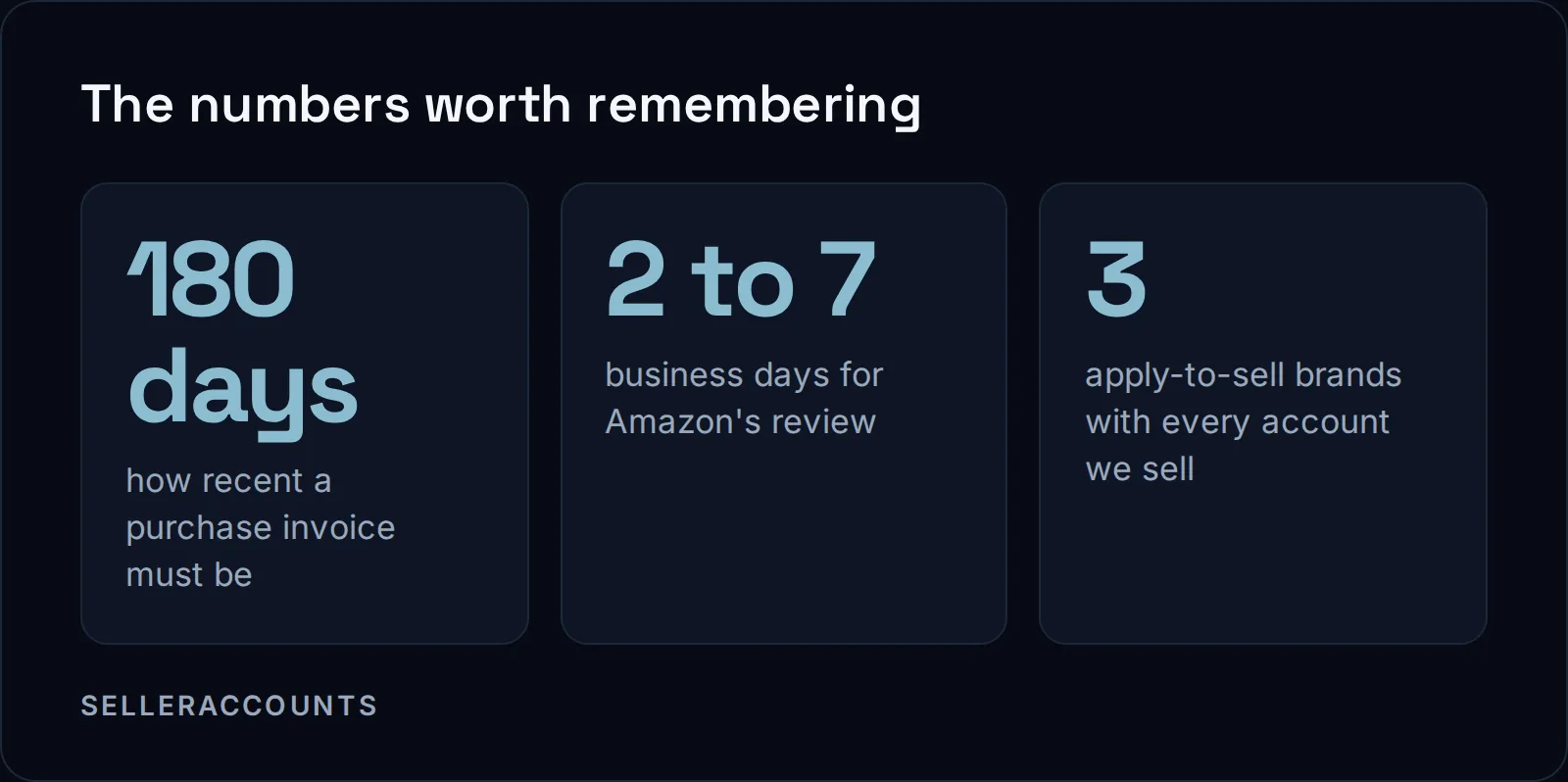
Read the approval page yourself before you send anything, and treat any invoice template from someone other than Amazon as a guess.
What we can add from our own work: when we run an application, the invoice has to be in the company name registered on the account. An invoice made out to anyone else does not match the account it is meant to prove.
Insurance has its own line. Amazon says sellers in categories with enhanced safety listing requirements must obtain and maintain commercial liability insurance covering those products, regardless of monthly gross proceeds.
Will Amazon Approve Your Apply to Sell Request?
Not always. Amazon says it may not accept applications for every product it restricts, and an apply to sell request can be declined. If Amazon replies "Your account does not qualify", its page says that decision cannot be appealed and Selling Partner Support cannot give more details.
The line from Amazon's FAQ, word for word:
"For certain restrictions, Amazon requires sellers to submit an application through Seller Central for review. If your request is approved, you will be able to list the product. However, we may not accept applications for every product we place selling restrictions on."
What we tell our own clients: we plan on one month for one brand, and it is usually faster, but the month is there so nobody panics if the first attempt is not approved. We cover the reasons behind a decline in why Amazon keeps declining your ungating application, and the timing in how long Amazon ungating takes.
Approval is also not forever. Amazon's FAQ says you may face new restrictions even on a product you sold before. A brand that is open today is worth checking again before you list.
Already Ungated vs Apply to Sell: What Is the Difference?
Already ungated means the brand is open on the account today: at least half of the products we check show Sell this product, with no application. Apply to sell means the account still has to submit invoices, wait for Amazon's review, and only then can it list.
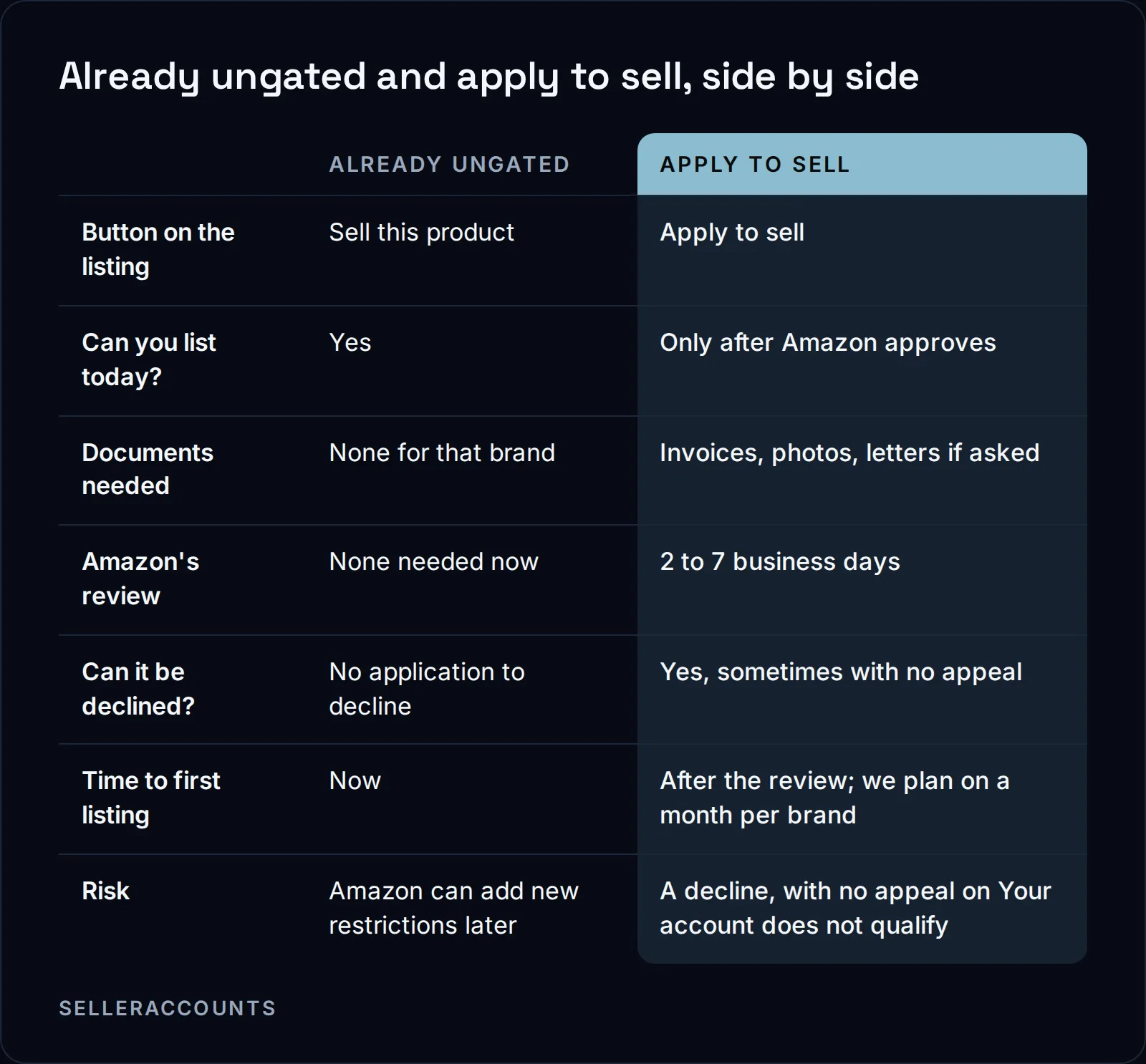
People also ask about the difference between ungated and approved on Amazon. In practice they land in the same place: the account can list. Approved usually means the account won an application. Ungated means it can list, however it got there. A brand can be sellable on an account without ever showing in Selling Applications, which is why the product check is the real test.
What This Means When You Buy an Account
When a seller says an account is ungated, ask one question: already ungated, or apply to sell? The answer changes what you are paying for. An already ungated brand is open on the account today; check your exact products against it before you sign. An apply to sell brand is work still to do, by someone, with invoices.
Here is how it works with us:
- Three brand approvals come with every account we sell, and those three are apply to sell, not already ungated. We do the application work for you, and each brand is named in your Deal Agreement.
- The brands already open on the account are a separate thing. An aged account often already carries dozens of brand approvals from its own history, shown live on a screen share before you buy.
- How we judge a brand open. We check a set of the brand's products on the account, twenty in our check, and the brand counts as open when at least half show Sell this product.
- The open list is a snapshot. Amazon and the brands change their rules, so check a brand yourself before you list. The brands written into your agreement are the ones we commit to.
- If a promised brand is still gated at delivery, we keep working on it. If it is not open 30 days after delivery, you get a replacement account, or a refund if no suitable replacement is found.
Other approvals, such as Hazmat, Seller Fulfilled Prime or Amazon Renewed, belong to a given account's record. We name one only where that account carries it.
Send us the brands or product codes you care about before you sign, as a spreadsheet or plain text. We check them against the real account and come back with a result for each, marked already ungated or apply to sell. Starting prices for accounts are on our price page; the figure for a specific account comes with its details, on the call.
If you are on the other side and want to sell an account, that is our sister brand, Cash For Stores.
FAQ
What does the apply to sell button on Amazon do?
It starts an application in Seller Central, and Amazon reviews it before you can list. When we open a brand on request, the approval then shows as approved under Selling Applications in Seller Central.
Why does it say apply to sell on a product I already sold?
Selling a product before does not keep it open, so the button can change on a listing you know well. Open the listing on your account and click Show limitations to see which approval it now needs.
Can a brand that says apply to sell open later on its own?
It can. In our own checks, a brand that was gated can open later, and one that was open can close, because Amazon and the brands change their rules. Check the product again before you list or apply.
Is ungated the same as approved on Amazon?
In practice, yes: both mean the account can list. Approved usually means the account won an application, while ungated means it can list however it got there.
Related pages
Ready to Grow Your Amazon Business?
Book a free demo call and we'll screen-share real accounts live to find the right match for your business. No screenshots, no guesswork.
Book Your Demo