
How an Amazon Account Transfer Works
Here's how an Amazon account transfer works, in the order it actually happens: you pick an account on a live demo, sign the Deal Agreement, pay, complete the onboarding forms in your portal, then we run the handover inside Amazon by hand. Standard handover is 10 to 14 business days. About half of transfers draw an extra Amazon verification request and run 30 to 60 days instead.
An aged Amazon seller account is one with real trading history already built into it, not a fresh registration. The Deal Agreement is the contract every buyer signs before the purchase price moves. It locks the account, the price, the timeline, and the brand approvals we promised. Delivery is the point where final login credentials and two factor access pass to you, and that starts your support window: 30 days, or until your first sale, whichever comes first.
What age actually buys is approvals a brand new account has to earn from zero: Hazmat, Seller Fulfilled Prime, Amazon Renewed, or a gated brand, each of which takes real trading history, supplier invoices, or months of waiting to qualify for. An account's record shows only the approvals it actually holds, never a promise about what every account carries. It does not buy a faster payout: since March 2026, every Amazon account settles every two weeks and holds each order's money until seven days after delivery, no matter how old the account is.
Step by Step: From Demo to Delivery
The process runs in seven stages, and you do not need to touch the Amazon dashboard yourself until credentials are in your hands. If you want to see what's actually in stock, browse our aged Amazon seller accounts page.
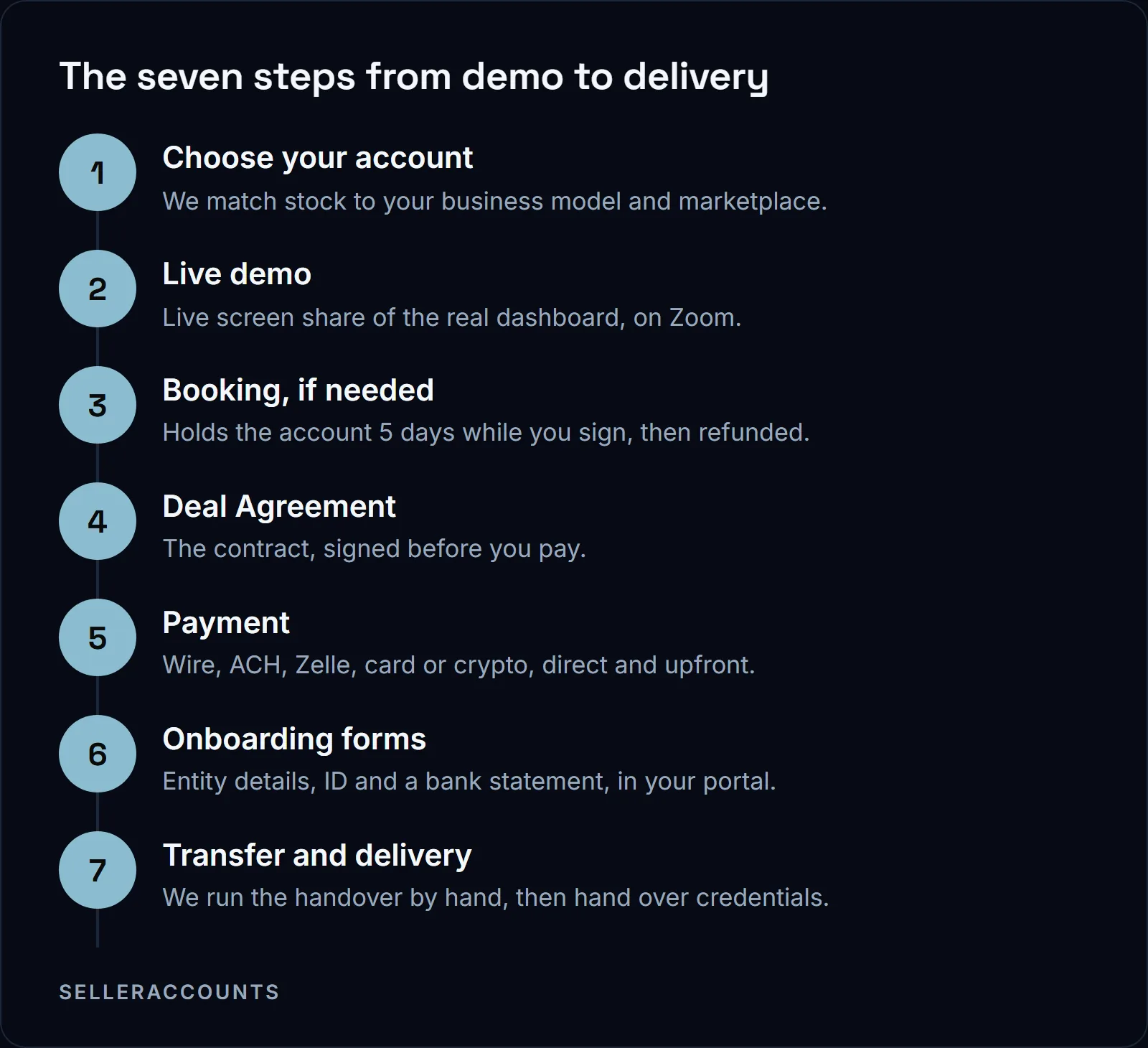
Choose your account. We ask about your business model, the brands or categories you need, the FBA capacity you want and your marketplace. We sell accounts on the US marketplace, and Canada where the account already has it open. We do not sell EU or UK marketplace accounts, because they are too complicated to transfer. On the accounts we do sell, we close out any EU or UK marketplace first.
Live demo. We screen share the real Seller Central dashboard: account health, brand approvals, FBA capacity, sales history, category approvals, and the disbursement schedule and bank details, shown live. Amazon settles every account every two weeks and holds each order's money until seven days after delivery, so that is the payout reality on any account you look at. Ask about anything you see.
Booking, if you need time. A deposit holds the account for five days while you sign, and after that it is refunded and the account goes back on the market.
Deal Agreement. This is the contract you sign, and it locks the account, the price, the payment terms, the timeline, every brand we promised, the support window, and the replacement and refund terms. You sign it before the purchase price moves.
Payment. Once it's signed, payment goes directly to us, upfront. See the payment table below for the five methods and their fees, and how buying works for the full contract terms.
Onboarding forms. In your portal at portal.selleraccounts.com, you provide business entity details, ID, a bank statement and US business information. Use a card, bank account and phone number that have never touched Amazon before: that is what anti-linking actually protects. If you asked for the Asset Purchase Agreement on the onboarding form, you sign it here.
Transfer and delivery. We run the handover inside Amazon by hand: the INFORM Act re-verification, account cleanup, email and two factor migration, the ownership data change, anti-linking setup, and every verification Amazon asks for. We send a status update every business day, then you get a credentials file and a portal walkthrough for your first login. The support window starts here.
What Happens If Amazon Asks for Extra Verification
About half of transfers draw an extra Amazon verification request, and that is the 30 to 60 day path, not a defect. Amazon re-verifies whoever is now registered on the account, and for a high volume seller the INFORM Consumers Act requires this within ten days of collecting the information. We handle the correspondence and any resubmission for you.
Amazon re-verifies the ID, business address, bank account, phone and tax ID now on file, the same set the INFORM Consumers Act requires for every high volume seller. If anything does not match what Amazon has on record, Amazon asks for it again, which is where the extra time comes from. We track it against the same daily update cadence as the rest of the transfer, so you are never guessing what stage you are on.
| Standard path | Extended path | |
|---|---|---|
| Timeline | 10 to 14 business days | 30 to 60 days |
| Share of transfers | About half | About half |
| What happens | Verifications clear on first submission | Amazon asks for a resubmission or extra document |
| What you do | Nothing extra | Provide what Amazon asks for, we handle the correspondence |
What Amazon's Own Pages Say About an Account Transfer
Start with the source. Amazon's help page "Can I transfer my seller account?" says:
"Seller accounts generally are not transferable. Seller accounts provide access to the tools and resources that sellers use to list their products and manage their orders. Seller accounts also include account activity history and buyer feedback. Every seller on Amazon must have a seller account and an agreement with Amazon that establishes the terms under which the seller lists and sells their products."
"If the ownership of a business changes for any reason, the new owner must establish a new seller account."
Its user permissions help page says the same thing without the word "generally":
"Although you can add users to your Professional seller account as secondary users, you can't transfer the account. If the business ownership changes, the new owner should establish a new seller account in their name."
So how have we sold 1,700+ accounts? Every deal we run is a documented change of business ownership, not a password handoff: when a business changes hands, the details Amazon holds on the account change with it, and we re-verify the new owner the way the INFORM Consumers Act requires. For a high volume seller, meaning one with 200 or more discrete sales of new or unused consumer products and $5,000 or more in gross revenue in any continuous 12-month period during the previous 24 months, the INFORM Consumers Act (15 U.S.C. 45f) makes Amazon collect the bank account, tax ID, contact details, working email and phone, and verify that information within ten days of collecting it.
The Deal Agreement and the Optional Asset Purchase Agreement
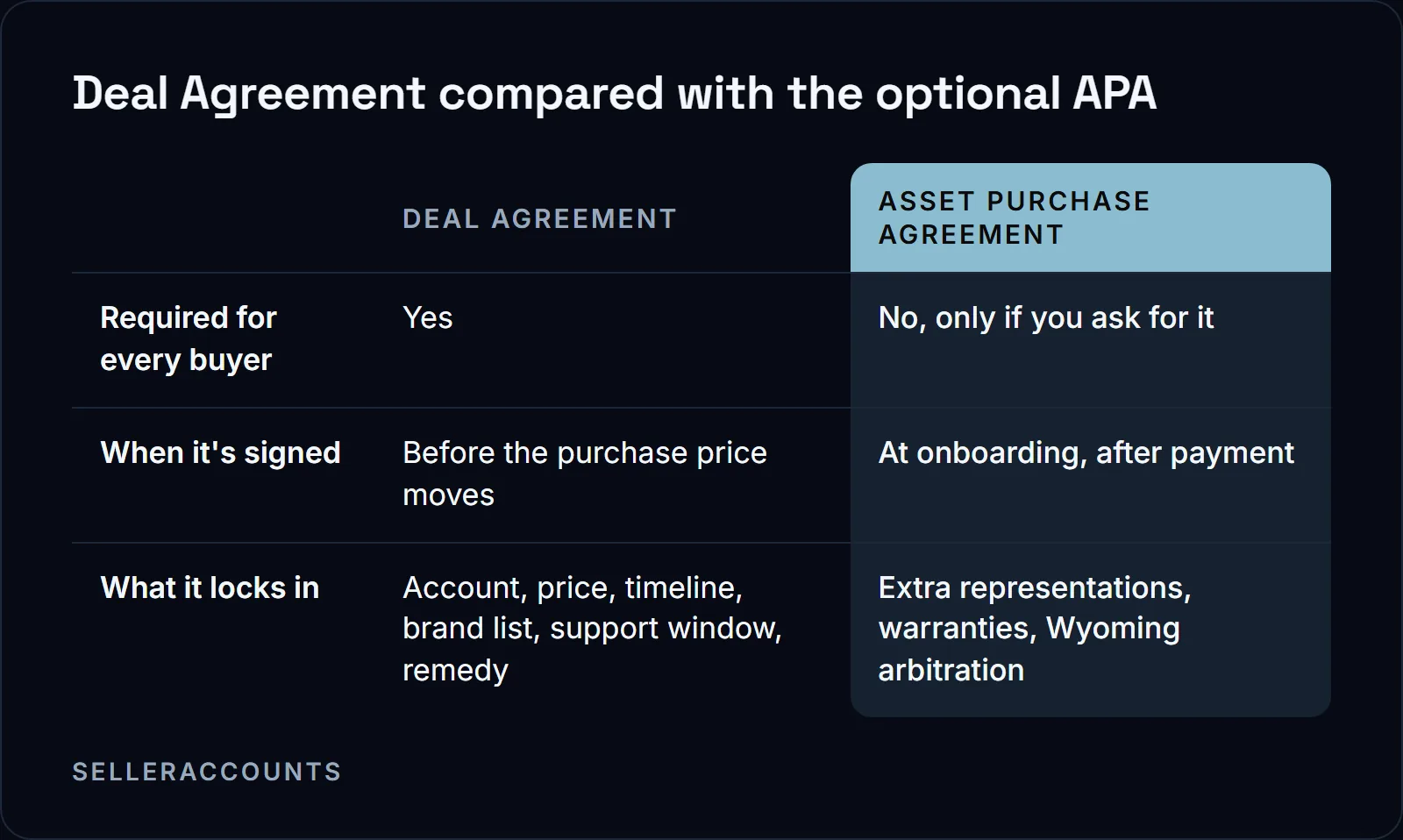
The Deal Agreement is the contract every buyer signs, and it is enough on its own to complete the transfer. The Asset Purchase Agreement, or APA, is not a default step: you request it on the onboarding form after payment. The Deal Agreement, signed before you pay, is what protects your money either way.
What the Deal Agreement locks in:
- The account itself, in the condition shown on the demo
- Full ownership transfer into your operating company
- Three included brand approvals, apply to sell only, each one named in the agreement
- The honest timeline, with a daily update cadence during transfer
- The support window, with an explicit covered and not covered list
- The replacement and refund remedy
- The payment terms
If you ask for the APA, it adds the seller's representations and warranties (rightful ownership, good standing, accurate approvals, no outstanding debts or liens) and is governed by Wyoming law with arbitration in Casper, Wyoming if a dispute ever needs it.
What You Can Pay With
Payment goes directly to us, upfront, once the Deal Agreement is signed. Five methods are available, and only one of them carries a fee. We don't publish account prices; see how buying works for how pricing is set.
| Method | Fee | Notes |
|---|---|---|
| Wire transfer | No fee | Sent directly to us, upfront |
| ACH | No fee | Bank transfer to our account |
| Zelle | No fee | Sent to the address on the payment menu |
| Card via Stripe | 3% on US cards, 4.5% on non-US cards | Processed through Stripe |
| Crypto | No fee | USDT or USDC only |
We do not accept BTC or ETH, so do not send them.
What Happens If a Brand Is Still Gated, or the Account Doesn't Match the Demo?
If a promised brand is still gated at delivery, or the account does not match the demo, one remedy applies: we source a suitable replacement first, and refund the purchase price in full if none is found within 30 days of delivery. Every brand we promise is named in the Deal Agreement, so there is no argument later about what was promised.
If a suspension is tied to the transfer itself, it falls inside your support window: verification resubmissions and Amazon correspondence about the transfer are covered, at no extra cost. We do not quote a timeline or promise an outcome, because we do not control Amazon's decision.
After Delivery: Support Until 30 Days or Your First Sale
Your support window opens the moment credentials are delivered and runs for 30 days or until your first sale, whichever comes first. Inside it, we handle anything Amazon asks about the transfer itself: an additional document, or a re-check. Your first sale is what closes the window, so use the days before it to work through this list while we are still on the hook:
- Replace the phone number we hand over at delivery. It carries an expiration date, and once it lapses Amazon cannot reach you for verifications.
- Log in and confirm two factor authentication works with your own app: 2FAS or Google Authenticator. We no longer recommend Authy.
- Verify every brand approval and category the demo showed you.
- Confirm FBA capacity and account health match what you saw live.
For the full checklist and security setup after handover, see how to protect your Amazon account after transfer.
FAQ
How long does an Amazon account transfer actually take?
Standard handover is 10 to 14 business days, and about half of transfers draw an extra verification request and run 30 to 60 days instead. The pace depends on how fast you supply documents and on Amazon's own verification queue, not on us.
How much does an aged Amazon account cost?
We don't publish account prices. For how pricing works, see how buying works, and for what's in stock, see our aged Amazon seller accounts. Payment itself runs through wire, ACH, Zelle, card or crypto, all upfront once the Deal Agreement is signed.
Is buying an Amazon account against Amazon's terms, and will it get suspended?
Amazon's own pages say seller accounts "generally are not transferable" and that a new owner must establish a new account. We reconcile that by running every deal as a documented change of business ownership, not a password handoff, re-verifying the new owner the way the INFORM Consumers Act requires. We do not quote a timeline or promise an outcome on whether Amazon flags any given account, because we do not control Amazon's decision, and any transfer-related verification is covered inside your support window.
Do I need a US business entity to buy an account?
Yes. Onboarding needs business entity details, ID, a bank statement and US business information, because the account transfers into an operating company. If you do not already have one, we can open it for you through Bizee at Bizee's own fee, with no markup, or you can set it up yourself first.
Can I sell my Amazon account instead of buying one?
If you are on the other side of this, exiting rather than entering, that is our sister brand's lane. Cash For Stores (cashforstores.com) buys accounts from their original owners. Everything on this site is for buyers.
What if the account has old negative feedback, or gets suspended after the transfer?
The account's history, including any negative feedback, is shown on the live demo before you buy, and what matters is that it's in good standing with no active violation at purchase. A suspension tied to the transfer itself is covered inside your support window at no extra cost, the same as any other transfer-related verification.
Related pages
Ready to Scale Your Amazon Business?
Book a free demo call and we'll screen-share real accounts live to find the right match for your business. No screenshots, no guesswork.
Book Your Demo