

The Short Answer
If you are opening an Amazon seller account, or taking over an aged one, Amazon will ask you to prove who you are, where your business sits and that it is real. The documents are a government-issued photo ID, a bank account or credit card statement, a business license where it applies, and proof of address such as a utility bill or a bank statement. On an aged account you buy from us, these same checks run in your name, and we make every submission to Amazon and coordinate the live video call with you.
Amazon puts the purpose in one line on its global verification page:
"We must verify the identity of the legal representative or beneficial owner registering the account, and the legitimacy of the business and address information."
A beneficial owner is the person who ultimately owns or controls the business, even when someone else runs the account day to day.
What Does Amazon Ask For to Verify a Seller Account?
Amazon's global verification page has you confirm four areas: identity, address, beneficial owner and business. The documents for them are listed on its Seller Identity Verification page and, for address, on the global page itself. Here it is as a checklist you can work down before you open the verification screen.
| What Amazon checks | What to have ready | Where it comes from |
|---|---|---|
| Your business | The exact business name and the company registration number | Amazon's registration guide |
| The primary contact person | Their identity details | Amazon's identity page |
| Identity | A government-issued photo ID | Amazon's identity page |
| Payment details | A bank account or credit card statement, if applicable | Amazon's identity page |
| The business itself | A business license, if applicable | Amazon's identity page |
| Address | One document from Amazon's accepted list (next section) | Amazon's global page |
| Tax ID | Your business tax identification number | The INFORM Consumers Act |
The primary contact person is the one person Amazon treats as speaking for the account. In our transfers, that is the person who sits the live video check when Amazon asks for one.
The page also says the options you see are customized to your business type and to the country, state or region where your business is located or where you live. So two sellers can open the same screen and get different upload boxes.
Before You Upload
The Amazon pages we read set no rules for how to photograph or scan a document. The screen you upload on carries its own instructions, and Amazon's identity page says to follow them. Two checks from Amazon's own pages are worth doing on every file:
- The business name matches, exactly, the name you registered with the government office.
- A business document was issued within the past 180 days.
Which Documents Does Amazon Accept, and What If You Have No Utility Bill?
Amazon's global verification page lists the documents it takes for professional sellers: a bank, credit card or payment provider statement, a utility bill, a rent or lease agreement, a building society or credit union statement, a mortgage statement, a tenancy bill, a tax document showing the address, or a business license or extract. No utility bill? A bank statement works.
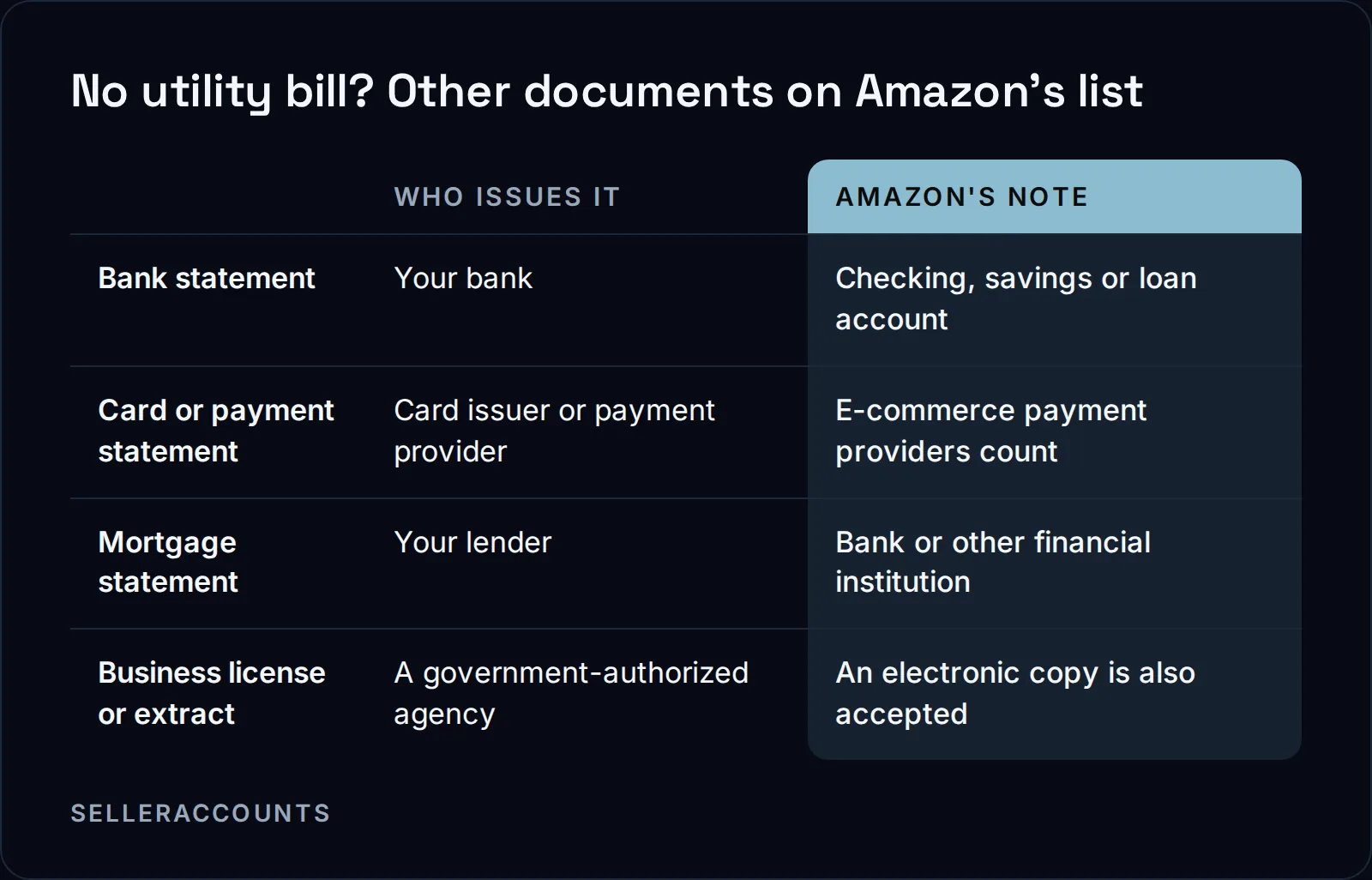
A professional seller is a seller on Amazon's paid selling plan. The list above is the one Amazon's page gives for that plan.
How Recent Do the Documents Need to Be?
Amazon's global verification page says your business documents must be issued within the past 180 days, and that a valid business document is issued by a government-authorized agency. For other documents, the part of the page we read sets no separate age limit, so check the live page for your country before you upload.
In Amazon's own words, "A valid business document is issued by a government-authorized agency."
180 days
the age limit Amazon sets for business documents
2 business days
when Amazon may contact you for clarification
10 to 14 days
our standard Amazon handover, in business days
30 to 60 days
how long a transfer runs when Amazon asks for extra checks (about half of transfers)
How Does Verification Run in Seller Central?
You confirm your details under Identity, Address verification, Beneficial owner and Business verification, then upload the documents the page asks for. The page shows options based on your business type and location. Once everything is in, Seller Central shows a confirmation, and Amazon may contact you within two business days if it needs clarification.
Amazon also says it keeps you informed by email, at the address you gave during registration. Watch that inbox.
In our transfers, Amazon sometimes asks for a live video verification call with the account's point of contact, which we schedule with you. Keep the same photo ID you uploaded within reach, because Amazon may ask for it again. A postcard with a code, sent to the business address, can follow.
On a brand new account, verification is the last of five registration steps in Amazon's registration guide:
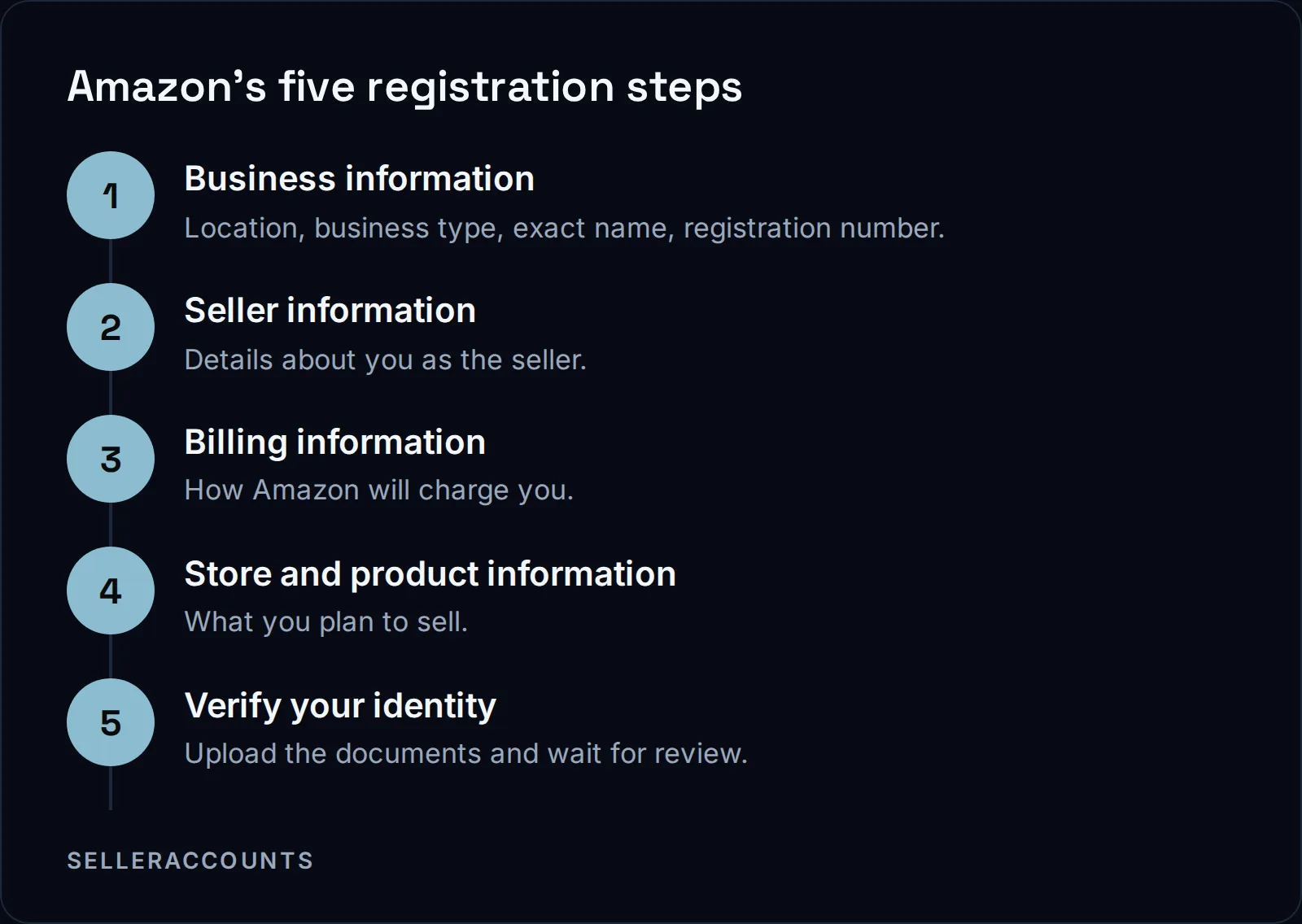
Two details in step one cause trouble later. Enter the business name exactly as it is registered with the government office. And the company registration number is not the same as your Employer Identification Number (EIN).
What the Amazon Pages Do Not Cover
The pages we read are silent on several questions:
- Whether translated, notarized or certified copies are accepted.
- Whether a screenshot or a downloaded record passes.
- What to do when your name or address is spelled slightly differently across documents.
- The exact reasons a file gets rejected.
Amazon's global seller identity, address, and business verification page does not answer them, and we will not guess at them here.
What we can tell you is what we see in our own transfers:
- Each redo costs time. When Amazon sends back an identity, bank, address, phone or tax ID check, each redo adds anywhere from 3 days to 4 weeks.
- A new company slows things down. If your EIN is not in Amazon's system yet, that alone adds 3 weeks to a month. We recommend a company formed at least 30 days before you buy.
- Address checks can come by post. Amazon sometimes sends a postcard with a code. You forward us the code when it arrives.
- Keep your originals. If Amazon asks again mid-transfer, we may need the same photo ID and bank statement you sent the first time.
What Changes When You Buy an Aged Account?
The same checks run again in your name. Amazon re-verifies the ID, business address, bank account, email, phone, tax ID and point of contact when ownership changes. You fill in one transfer form with your entity details, photo ID and a bank statement, and we make every submission to Amazon ourselves.
We are not hiding the change from Amazon. Passing that verification is the transfer, and we hand the account over only once Amazon's checks are through. The transfer form comes to us, not to Amazon. If one document is not ready, send us the form anyway and add the missing document after.
| Verifying a new account yourself | Taking over an aged account from us | |
|---|---|---|
| Documents | Yours, uploaded by you | Yours, on one transfer form |
| Who deals with Amazon | You | We make every submission and coordinate the video call with you |
| Updates | Amazon's emails | A status update from us every business day |
| How long | Amazon's review, plus any clarification it asks for | 10 to 14 business days standard; 30 to 60 days when Amazon asks for extra checks |
| After verification | Approvals still wait on selling history, supplier orders and months | Approvals the account already holds, shown live before you buy |
| After handover | On your own | Support until 30 days after delivery or your first sale, whichever comes first |
This is the real choice. Verification is a gate every seller passes, new or aged. A new account clears it and then starts from zero on approvals. An aged account clears it in your name and keeps the approvals its record already carries, such as Hazmat, Seller Fulfilled Prime or Amazon Renewed, named only where that account's record shows them.
Starting prices are on the price page, and the figure for a specific account comes with its details on the call. The full process, from the first call to delivery, is on how buying works.
FAQ
Do I need a business license to verify an Amazon seller account?
Amazon's identity page lists a business license only "if applicable." Its global page accepts a business license or business extract, and says an electronic copy is also accepted.
Can I use a bank statement instead of a utility bill?
Yes, a bank statement for a checking, savings or loan account is on Amazon's list. The full list is in the section on which documents Amazon accepts, above.
How long does Amazon take to review my documents?
Amazon says it may contact you within two business days if it needs clarification, and keeps you informed by email. The pages we read give no time for the final decision.
Is the company registration number the same as my EIN?
No. Amazon's registration guide says the company registration number is the one issued when you registered your business, and that it is not the same as your Employer Identification Number.
I want to sell my verified account. Who buys it?
We sell accounts, we do not buy them. Our sister brand Cash For Stores buys Amazon, Walmart and eBay seller accounts.
Related pages
Ready to Grow Your Amazon Business?
Book a free demo call and we'll screen-share real accounts live to find the right match for your business. No screenshots, no guesswork.
Book Your Demo