
The Short Answer
eBay selling limits exist so a seller grows at a pace it can serve, and eBay raises them as the seller shows it can meet buyer demand. An aged account starts at whatever limit its own trading record has already earned, read in Seller Hub on that account, not at a figure that comes with its age.
A selling limit is the monthly cap eBay puts on how much one account can list and sell. It belongs to the account, not to the person running it. So the useful question is never how old it is. It is what the account carries today, and whether it is selling now.
Why Do eBay Selling Limits Exist?
Because eBay carries the risk of the order that never ships. A brand new account has nothing on it that says its orders will ship, so it gets a small allowance and earns the rest as it sells. The limit is the brake on that risk, and it loosens as the record grows.
eBay's own words:
"Selling limits are designed to help you grow your business in a manageable way and to ensure you can give your buyers great service. As you get more comfortable meeting buyer demand, we’ll increase your limit."
Source: eBay's selling limits help page.
Where Do You Find Your Selling Limit, and How Does It Go Up?
You find it in Seller Hub, eBay's dashboard for sellers, on the account itself. It may go up when, in eBay's words, your selling performance and sales metrics are strong. You ask for more through Request higher selling limits, in the Monthly selling limits section of My eBay's Selling Overview.
eBay's line on the lever:
"If your selling performance and sales metrics are strong, you may be able to have your limits increased."
eBay tells you to check that performance in Seller Hub or in your Seller Dashboard. It also gives one shortcut of its own:
"If you have more than one seller account, you may also be able to raise your limits by linking to your other, more established seller account."
That is eBay saying an established record carries weight. The option only shows up if your accounts can be linked.
What the page does not cover: a published figure for any account, and how much identity checks, feedback, defects, cancellations or late shipping each move the number. eBay does not break that down, so nobody honest can either. If a request comes back as no, the answer is the same as for a low limit: sell inside the cap you have, cleanly, then ask again.
What Happens If You List or Sell Past the Limit?
eBay may end the listings you created over your limit, and you can list them again when the monthly allowance renews or when eBay raises your limit. Good 'Til Cancelled listings, the ones that renew until you end them, count toward the limit and stop renewing once you reach the maximum.
The bigger risk sits next to the limit, in the money. A transaction hold is eBay keeping the funds from an order until a condition is met, usually confirmed delivery. eBay's transaction holds page says that on unusual selling activity or a sudden increase in order volume, "the funds for a seller's future and not yet delivered orders will be held".
The account level version is on the payouts page:
"Payouts may be held if we identify unusual activity associated with your account, such as increased customer claims, a sudden change in your selling activity, late deliveries, or negative buyer feedback"
So an account that traded quietly for years and then jumps far above its normal volume gets treated as a risk. The orders keep shipping while the cash waits. Both pages are worth a look before you plan a launch: transaction holds and getting paid for items you've sold.
Where Does an Aged eBay Account Actually Start?
At whatever limit its own record has earned, and nowhere else. eBay's selling limits page gives no starting figure for any account, so the only honest number is the one in Seller Hub on that account. Age does not set the limit; the selling performance and sales metrics behind the account do.
By an aged account we mean one registered years ago that has traded since, with its own feedback, completed sales and seller standing. The registration date on its own buys nothing on eBay's pages. The record does.
Recent selling matters as much as the record. eBay holds funds until delivery is confirmed for sellers with no recent selling history, and its holds page says so to sellers who once qualified for faster money:
"If you previously qualified to receive your funds faster as a new seller, you may experience this hold if you haven't sold in a while."
Whether a long idle spell lowers the selling limit itself, the selling limits page does not say. Our own notes treat an eBay account that has sat for years as an uncertain reactivation, and a Below Standard seller standing as a red flag. That is why we look at recent orders before anything else.
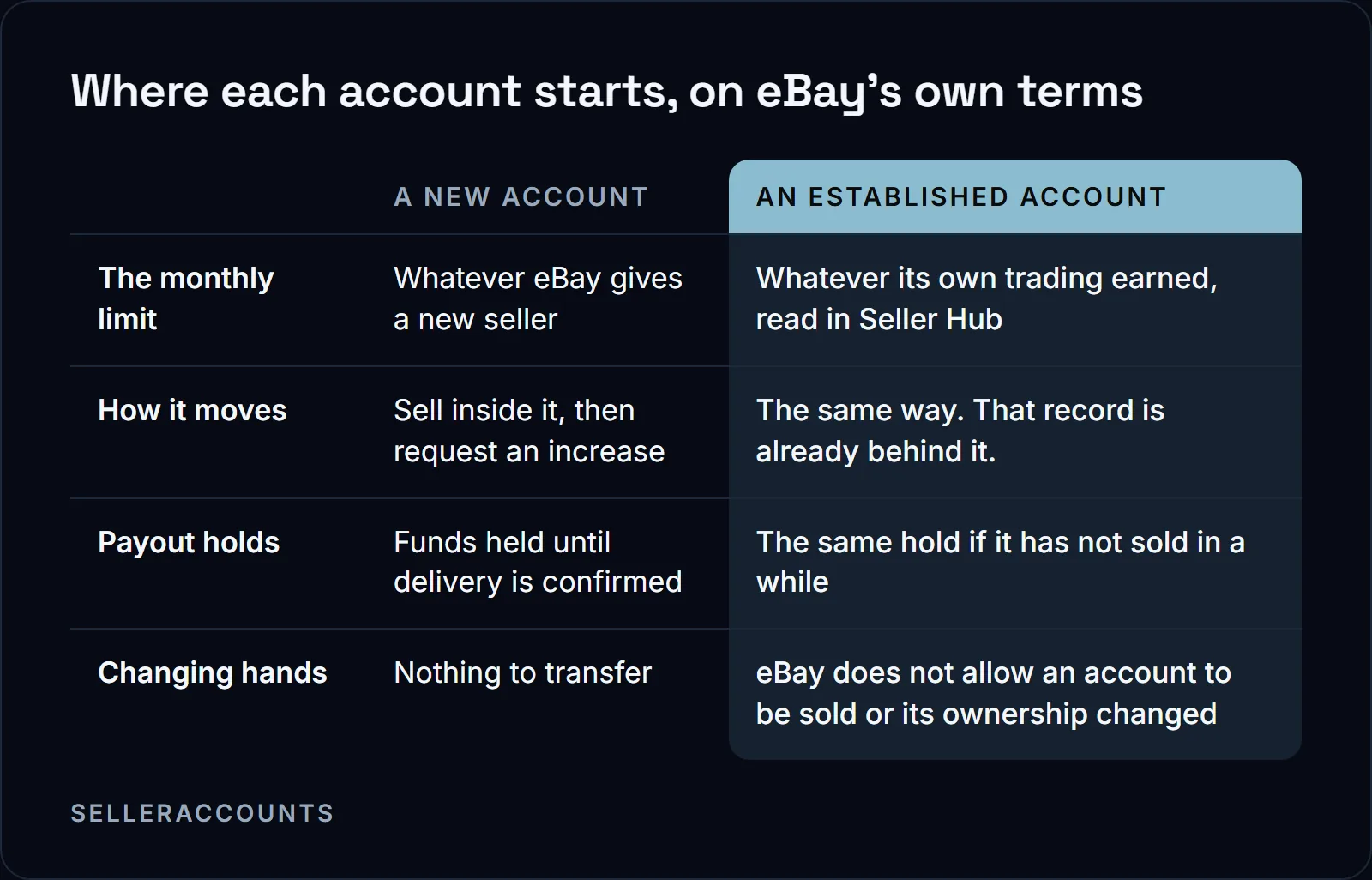
Four things are worth comparing on any account you are weighing, and all four sit on the account itself:
| What to compare | Why it matters | Where you see it |
|---|---|---|
| The current monthly selling limit | It is the ceiling the account carries today | Seller Hub, on the account itself |
| Feedback and completed sales | The record any increase was built on | Seller Hub or the Seller Dashboard |
| Seller standing and defects | A high limit on a damaged account is worth much less | The Seller Dashboard |
| Recent selling activity | An idle account is held like a new one | The account's recent orders |
Anyone who cannot show you all four on a screen share is showing you a screenshot, not an account.
There is no safe first month eBay publishes either. What its pages do say is that a sudden jump in volume triggers holds, so trade into the account at the pace its history supports and grow from there.
Can You Use Another Account to Get Around a Selling Limit?
No. eBay's multiple account policy says registering new accounts, or using other existing accounts, to avoid buying and selling restrictions or limits is not allowed. Running more than one account is fine, but every account is held to the same buyer and seller standards, and eBay expects a problem on one to be resolved before you keep selling on the others.
The policy, word for word:
"Registering new accounts to avoid buying and selling restrictions or limits, or other policy consequences, is not allowed on eBay."
"Users are expected to resolve issues as they arise, and follow the steps provided by eBay to bring accounts back into good standing before continuing to buy or sell with other accounts."
So the routes are not equal. Here they are side by side:
| Route | What it takes | What eBay's pages say |
|---|---|---|
| Grow your own account | Months of clean selling inside the cap, then a request | The limit rises on strong performance and sales metrics |
| Link to your own established account | A second account of yours with a stronger record | eBay names this as a way to raise limits |
| A second account to dodge a limit or restriction | Nothing eBay accepts | Not allowed under the multiple account policy |
| An aged account bought from someone else | A record it already has | eBay does not allow an account to be sold, see below |
If your own account is restricted or suspended and the plan is to step around it, eBay's policy is against you, and we will say so on the call. We do not offer reinstatement.
Full policy: eBay's multiple account policy.
Is Buying an Aged eBay Account Inside eBay's Rules?
No. eBay's help page says you can't sell your eBay account or change its ownership, and its User Agreement lists transferring an account and user ID to another party without eBay's consent as something you agree not to do. Attempting to sell one can bring restrictions, suspension or removal.
Both rules, verbatim:
"In the interest of protecting our buyers and sellers, and maintaining a safe marketplace, you can't sell your eBay account or change its ownership."
"Attempting to sell an eBay account may result in buying and selling restrictions as well as account suspension or removal."
Nobody should call that a loophole, and we don't. It is a risk the buyer weighs with eyes open. What changes hands, what does not, and what we will and will not do is in can you transfer an eBay account to a new owner.
How Buying an eBay Account Runs With Us
We have sold 1,700+ aged Amazon, Walmart and eBay seller accounts since 2020. Amazon is the core of it. The same buyers who buy an aged Amazon seller account from us also buy eBay accounts, to spread their risk so one suspension does not end the business.
On eBay the process is the same shape, with eBay's own timeline.
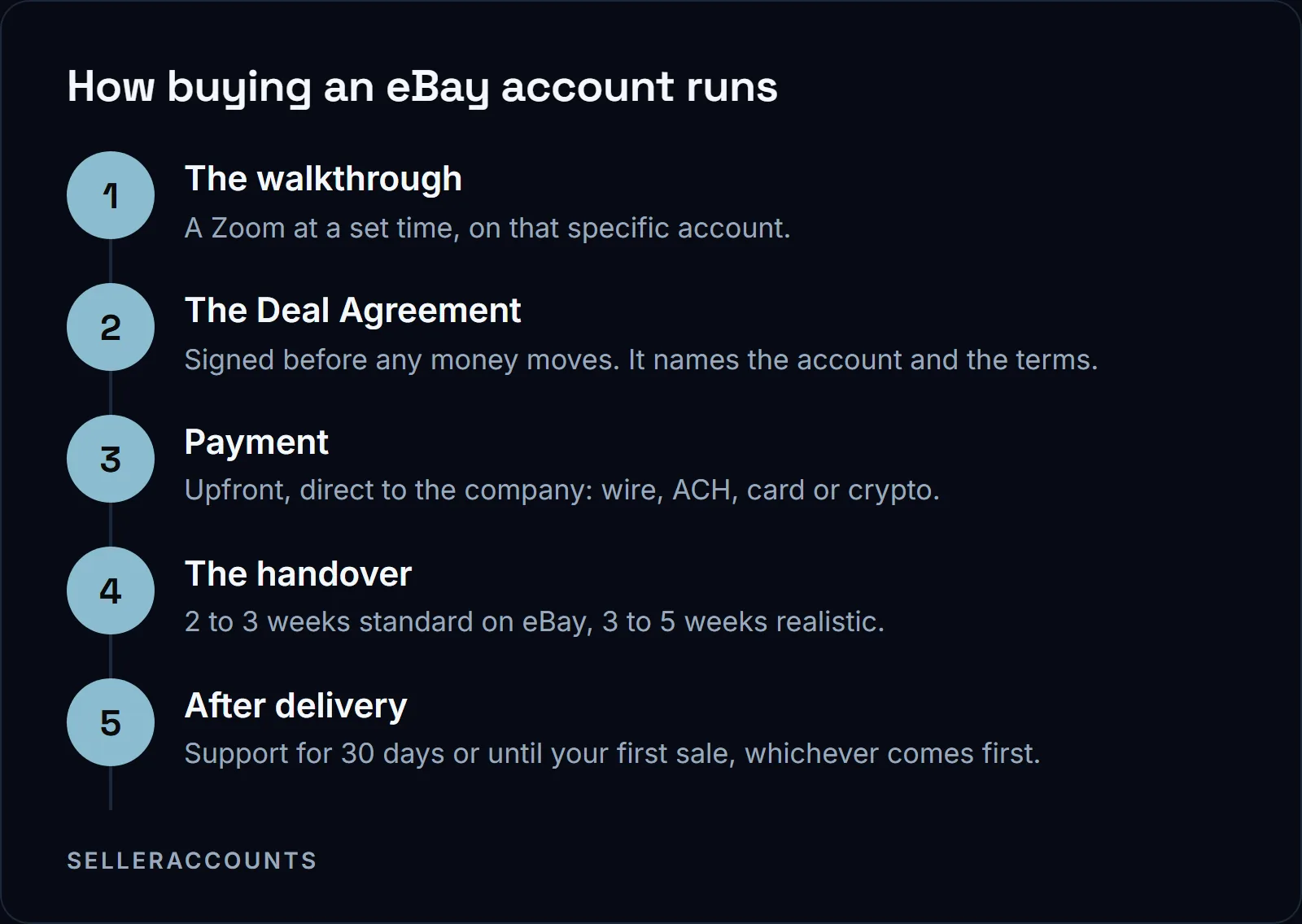
The Deal Agreement is the contract you sign before you pay. It locks the account, the price, the payment terms, the timeline and the support window. Payment goes to us upfront by wire, ACH, Zelle, card via Stripe, or crypto in USDT or USDC only.
Each eBay account is priced on its own, and the figure comes with that account's details on the call. If the ceiling is what stops you, start with the live stock on buy an aged eBay seller account, then read how buying works for the terms.
If you want to sell an eBay account instead, our sister company Cash For Stores (cashforstores.com) buys them. You book a 45-minute account evaluation call there, and an offer only goes out after that call.
FAQ
I had an eBay account suspended before. Does my name on the transfer matter?
It can: eBay expects a past suspension to be resolved before you sell on other accounts. Tell us before the deal, on the call. eBay's multiple account policy expects issues to be resolved and accounts brought back into good standing before you keep selling with other accounts, and it does not allow another account to be used to avoid restrictions. The transfer form asks for your entity details, photo ID and a bank statement, so a past suspension is something we look at with you up front, before you pay.
Will an aged eBay account get paid faster?
Not because of its age. eBay pays out daily by default, with funds typically available 1 to 2 days after the buyer pays, plus 1 to 3 business days at the bank. It holds funds until delivery is confirmed for new sellers, for accounts with no recent selling history, for 30 days after a suspension is lifted, and when it sees unusual activity.
Do eBay selling limits reset every month?
The allowance is monthly, so a cap you hit this month is not a permanent ceiling. Listings eBay ended for being over the limit can go back up when the allowance renews or when you get an increase.
How long until eBay raises my selling limit?
eBay's selling limits page gives no timeline. It says the limit may be increased when your selling performance and sales metrics are strong, and you ask through Request higher selling limits in the Monthly selling limits section of My eBay's Selling Overview. Until then, watch your performance in Seller Hub or the Seller Dashboard, which is where eBay tells you to look.
Do some eBay categories have their own limits?
eBay's selling limits help page, in the passages we work from, does not cover category limits. It covers the account's monthly limit, where to find it in Seller Hub and how to ask for more. Before you plan stock in one category, read the limits shown in Seller Hub on that account and check eBay's selling limits page for your category.
Related pages
Ready to Grow Your Amazon Business?
Book a free demo call and we'll screen-share real accounts live to find the right match for your business. No screenshots, no guesswork.
Book Your Demo